NHTSA Campaign Number: 18V685
Manufacturer Toyota Motor Engineering & Manufacturing
Components AIR BAGS, ELECTRICAL SYSTEM
Potential Number of Units Affected 168,187
Air Bags May Not Deploy as Intended/FMVSS 208, 214
If the air bags do not deploy as intended, it can increase the risk of injury in a crash.
Summary
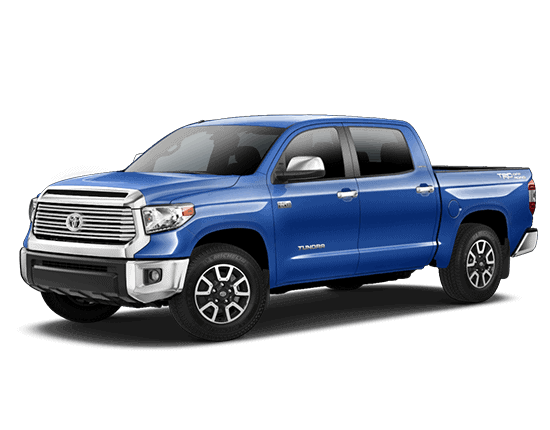
Toyota Motor Engineering & Manufacturing (Toyota) is recalling certain 2018-2019 Toyota Tundra and Sequoia vehicles and 2019 Toyota Avalon and Avalon Hybrid vehicles. The air bag electronic control unit (ECU) may erroneously detect a fault during the vehicle start-up self check. If this occurs, the ECU may not deploy the airbags as intended, in the event of a crash. As such, these vehicles fail to comply with the requirements of Federal Motor Vehicle Safety Standard (FMVSS) number 208, “Occupant Crash Protection,” and 214, “Side Impact Protection.”
Remedy
Toyota will notify owners, and dealers will update the software for the air bag ECU, free of charge. The recall is expected to begin October 22, 2018. Owners may contact Toyota customer service at 1-888-270-9371. Toyota’s number for this recall is J0X.
Notes
Owners may also contact the National Highway Traffic Safety Administration Vehicle Safety Hotline at 1-888-327-4236 (TTY 1-800-424-9153), or go to www.safercar.gov.
Check if your Vehicle has a Recall
Original Publication Date: October 5, 2018
To: All Toyota Dealer Principals, General Managers, Service Managers, and Parts Managers
SAFETY (NONCOMPLIANCE) RECALL J0X (Remedy Notice)
Certain 2019 Model Year Avalon
Certain 2019 Model Year Avalon HV
Certain 2018 – 2019 Model Year Sequoia
Certain 2018 – 2019 Model Year Tundra
SRS Sensor Software Update
| Model / Years | Production Period | Approximate Total Vehicles | Approximate Stop Sale Dealer Inventory |
|---|---|---|---|
| Avalon 2018 | Late April 2018 – Late September 2018 | 13,800 | 6,500 |
| Avalon HV 2018 | Late April 2018 – Late September 2018 | 4,100 | 1,600 |
| Sequoia 2018 – 2019 | Early August 2017 – Late September 2018 | 12,600 | 2,500 |
| Tundra 2018 – 2019 | Early August 2017 – Late September 2018 | 137,700 | 23,600 |
 | STOP! DO NOT SELL NEW VEHICLES IN DEALER INVENTORY.
Refer to Dealer Inventory Procedures section for more details. | |
On October 4, 2018, Toyota filed a Noncompliance Information Report (NCIR) with the National Highway Traffic Safety Administration (NHTSA) informing the agency of our intent to conduct a voluntary Safety (Noncompliance) Recall on certain 2018 – 2019 model year Sequoia and Tundra vehicles and certain 2019 model year Avalon vehicles.
Condition
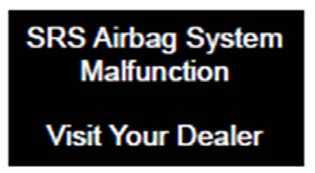
Due to inappropriate programming in the airbag electronic control unit (ECU), a fault may be erroneously detected during vehicle startup which would disable one or more of the sensors used to detect crashes. This could result in the side and curtain shield airbags and/or front and knee airbags not deploying as designed in a crash. As a result, there is an increased risk of injury in the event of a crash and regulatory requirements in certain markets may not be met.
NOTE: This condition will set one of the following Diagnostic Trouble Codes: B1610, B1615, B1630, B1635, B1690, or B1695.
Remedy
For the involved vehicles, any authorized Toyota dealer will perform a software update on the center airbag sensor assembly FREE OF CHARGE to the customer.
NOTE: The remedy for J0X addresses the H0Y condition, the J0H condition, and the J0X condition. As a result, J0H is no longer active as of October 5, 2018 (note that H0Y is no longer active as of February 20, 2018, due to the launch of J0H). All vehicles involved in J0H and H0Y (whether or not J0H and/or H0Y were completed) are now included in Safety (Noncompliance) Recall J0X.
Covered Vehicles
There are approximately 168,200 vehicles covered by this Safety (Noncompliance) Recall. Approximately 540 vehicles involved in this Safety (Noncompliance) Recall were distributed to Puerto Rico.
Owner Letter Mailing Date
Toyota will begin to notify owners in late October 2018.
Toyota makes significant effort to obtain current customer name and address information from each state through industry resources when mailing owner letters. In the event your dealership receives a notice for a vehicle that was sold prior to the Safety (Noncompliance) Recall announcement, it is the dealership’s responsibility to forward the owner letter to the customer who purchased the vehicle.
Please note that only owners of the covered vehicles will be notified. If you are contacted by an owner who has not yet received a notification, please verify eligibility by confirming through TIS prior to performing repairs. Dealers should perform the repair as outlined in the Technical Instructions found on TIS.
Dealer Inventory Procedures
New Vehicles in Dealership Inventory
There are approximately 34,200 vehicles in new dealer inventory as of October 4, 2018.
Toyota reimburses dealers for flooring costs associated with new vehicles held in dealership inventory until the recall remedy becomes available. Toyota provides these flooring reimbursements at 60 day intervals. Toyota reserves the right to withhold or charge-back any flooring reimbursement funds that may have been paid to the dealer if it determines that a new vehicle subject to a safety (noncompliance) recall was sold without first being remedied. Vehicle Safety (Noncompliance) Recall completion should always be verified through TIS. We request your assistance to ensure involved vehicles are identified and not delivered prior to performing the remedy. |
NOTE: Dealers can identify if any of their new and used inventory has any open campaigns in the Vehicle Inventory Summary available in Dealer Daily (https://dealerdaily.toyota.com/). The Vehicle Inventory Summary may take up to 4 hours to populate information for newly launched campaigns.
Inspection Reminder Mirror Hang Tags for Covered Vehicles in New Dealer Stock
To easily recognize vehicles involved in this Safety (Noncompliance) Recall, each dealership should utilize Inspection Reminder Hang Tags. Inside the vehicle’s glove box are stickers containing the VIN. Apply one of these stickers to the hang tag and install the hang tag in the vehicle. A sample copy of the Inspection Reminder Hang Tag has been included for your reference.

| Part Number | Description | Quantity |
|---|---|---|
| 00411-140003 | Inspection Mirror Hang Tag | 25 Per Pack |
NOTE: Dealerships can order hang tags from the Material Distribution Center (MDC).
Pre-Owned Vehicles in Dealer Inventory
To ensure customer satisfaction, Toyota requests that dealers complete this Safety (Noncompliance) Recall on any used vehicles currently in dealer inventory that are covered by this Safety (Noncompliance) Recall prior to customer delivery. However, if the campaign cannot be completed (for example, due to remedy parts availability), delivery of a covered vehicle is acceptable if disclosed to the customer that the vehicle is involved in a Safety (Noncompliance) Recall.
Toyota expects dealers to use the attached Customer Contact and Vehicle Disclosure Form to obtain vehicle buyer information. Dealers are expected to provide a copy of the completed form, along with the most current FAQ, to the vehicle buyer. Toyota and the dealer may use this information to contact the customer when the remedy becomes available.
Keep the completed form on file at the dealership and send a copy to quality_compliance@toyota.com. In the subject line of the email state “Disclosure Form J0X” and include the VIN.
NOTE: Dealers can identify if any of their new and used inventory has any open campaigns in the Vehicle Inventory Summary available in Dealer Daily (https://dealerdaily.toyota.com/). The Vehicle Inventory Summary may take up to 4 hours to populate information for newly launched campaigns.
Toyota Certified Used Vehicle (TCUV)
The TCUV policy prohibits the certification of any vehicle with an outstanding Safety (Noncompliance) Recall, Special Service Campaign, or Limited Service Campaign. Thus, no affected units are to be designated, sold, or delivered as a TCUV until all applicable Safety (Noncompliance) Recalls, Special Service Campaigns, and Limited Service Campaigns have been completed on that vehicle.
Toyota Rent-A-Car (TRAC) & Service Loaners
Toyota requests that dealers remove all TRAC and Service Loaner vehicles from service that are covered by a Safety (Noncompliance) Recall unless the defect has been remedied.
Customer Handling, Parts Ordering, and Remedy Procedures
Customer Contacts
Customers who receive the owner letter may contact your dealership with questions regarding the letter and/or the Safety (Noncompliance) Recall. Please welcome them to your dealership and answer any questions that they may have. A Q&A is provided to assure a consistent message is communicated.
Customers with additional questions or concerns are asked to please contact the Toyota Customer Experience Center (1-888-270-9371) – Monday through Friday, 7:00 am to 7:00 pm, Saturday 7:00 am to 4:30 pm Central Time.
Media Contacts
It is imperative that all media contacts (local and national) receive a consistent message. In this regard, all media contacts must be directed to Tania Saldana (859) 815-9968 in Toyota Corporate Communications. Please do not provide this number to customers. Please provide this contact only to media.
Technician Training Requirements
The repair quality of covered vehicles is extremely important to Toyota. All dealership technicians performing this repair are required to successfully complete the most current version of the E-Learning course “Safety (Noncompliance) Recall and Service Campaign Essentials”. To ensure that all vehicles have the repair performed correctly; technicians performing this repair are required to currently hold at least one of the following certification levels:
- Certified Technician (any specialty)
- Expert Technician (any specialty)
- Master Technician
- Master Diagnostic Technician
Always check which technicians can perform the repair by logging on to https://www.uotdealerreports.com. It is the dealership’s responsibility to select technicians with the above certification level or greater to perform this repair. Carefully review your resources, the technician skill level, and ability before assigning technicians to this repair. It is important to consider technician days off and vacation schedules to ensure there are properly trained technicians available to perform this repair at all times.
Remedy Procedures
Refer to TIS for Technical Instructions on repair. Conduct all non-completed Safety (Noncompliance) Recalls and Service Campaigns on the vehicle during the time of appointment.
Repair Quality Confirmation
The repair quality of covered vehicles is extremely important to Toyota. To help ensure that all vehicles have the repair performed correctly, please designate at least one associate (someone other than the individual who performed the repair) to verify the repair quality of every vehicle prior to customer delivery.
Warranty Reimbursement Procedures
Warranty Reimbursement Procedure
| Op Code | Description | Flat Rate Hours |
|---|---|---|
| TBD | Reflash SRS ECU Assembly | 0.8 |
- Warranty claim filing will be available by 10/18/2018
- Until warranty claim filing is available, stop sale units may be sold to customers after the remedy is performed if the remedy is documented on an RO.
- In rare cases that the SRS ECU contains the latest calibration ID (no software update needed), use opcode TBD.
- The flat rate times include 0.1 hours for administrative cost per unit for the dealership.
Claim Filing Accuracy and Correction Requests
It is the dealer’s responsibility to file claims correctly for this Safety (Noncompliance) Recall. This claim filing information is used by Toyota for various government reporting activities; therefore, claim filing accuracy is crucial. If it has been identified that a claim has been filed using an incorrect Op Code or a claim has been filed for an incorrect VIN, refer to Warranty Procedure Bulletin PRO17-03 to correct the claim.
Campaign Designation / Phase Decoder
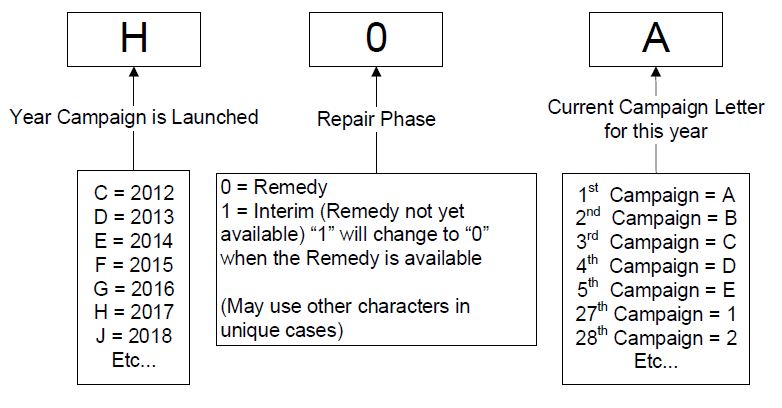 |
| Examples: C1B = Launched in 2012, Interim Phase, 2nd Campaign Launched in 2012 E0A = Launched in 2014, Remedy Phase, 1st Campaign Launched in 2014 J0A = Launched in 2018, Remedy Phase, 1st Campaign Launched in 2018. |
Please review this entire package with your Service and Parts staff to familiarize them with the proper stepby-step procedures required to implement this Safety (Noncompliance) Recall.
Thank you for your cooperation.
TOYOTA MOTOR SALES, U.S.A., INC.
SAFETY (NONCOMPLIANCE) RECALL J0X (Remedy Notice)
Certain 2019 Model Year Avalon
Certain 2019 Model Year Avalon HV
Certain 2018 – 2019 Model Year Sequoia
Certain 2018 – 2019 Model Year Tundra
SRS Sensor Software Update
Frequently Asked Questions
Original Publication Date: October 5, 2018
| Q1: | What is the condition? | |||||||||||||||
| A1: | Due to inappropriate programming in the airbag electronic control unit (ECU), a fault may be erroneously detected during vehicle startup which would disable one or more of the sensors used to detect crashes. This could result in the side and curtain shield airbags and/or front and knee airbags not deploying as designed in a crash. As a result, there is an increased risk of injury in the event of a crash and regulatory requirements in certain markets may not be met.
NOTE: This condition will set one of the following Diagnostic Trouble Codes: B1610, B1615, B1630, B1635, B1690, or B1695. Q1a: Are there any warnings that this condition exists? A1a: If this condition has occurred, warning lights and messages will illuminate in addition to a warning chime. As a result, if you see these warning lights and messages, you may be experiencing the condition described above. You should contact your local authorized Toyota dealer for diagnosis and appropriate repair as soon as possible.
| |||||||||||||||
| Q2: | What should I do if my Airbag Warning Light illuminates? | |||||||||||||||
| A2: | The Airbag Warning Light is designed to come on when the engine switch is turned to the “ON” position during the ignition cycle check function. Under normal operation, it goes off after a few seconds. The warning light turning off after the check period means the system is operating as designed.** If the Airbag Warning Light (1) does not illuminate or (2) illuminates or remains illuminated after the few second check period, you may be experiencing this condition, and the side and curtain shield airbags and/or front and knee airbags may not deploy as designed in a crash. Please contact your local authorized Toyota dealer promptly for diagnosis and appropriate repair. If the warning lamp illumination is related to the condition covered by this Safety Recall, the inspection and potential repair will be performed at no charge to you.
** Please refer to the Owner’s Manual for additional operation details related to this system. | |||||||||||||||
| Q3: | What is Toyota going to do? | |||||||||||||||
| A3: | Toyota will send an owner notification by first class mail starting in late October 2018, advising owners to make an appointment with their authorized Toyota dealer to have a software update performed to correct this condition FREE OF CHARGE. | |||||||||||||||
| Q4: | I previously received letters from Toyota about software updates for my vehicle. Do I still need to get this update completed? | |||||||||||||||
| A4: | Yes. This is an important Safety (Noncompliance) Recall. The previous software changes (Safety (Noncompliance) Recall designated by Toyota as “J0H” and Special Service Campaign designated by Toyota as “H0Y”) address different issues relating to the Vehicle Stability Control System, and an incorrect value being recorded for one data item in the Event Data Recorder. This recall revises the software in the Center Airbag Sensor Electronic Control Unit for all of these conditions.
Q4a: If I had Safety (Noncompliance) Recall J0H and/or Special Service Campaign H0Y performed, do I still have to get this recall performed? A4a: Yes. This is an important Safety (Noncompliance) Recall. The software update in both Safety (Noncompliance) Recall J0H and Special Service Campaign H0Y does not address the condition in this Safety (Noncompliance) Recall. Q4b: If I have this Safety (Noncompliance) Recall J0X completed, do I still have to complete Safety (Noncompliance) Recall J0H and/or Special Service Campaign H0Y? A4b: No. The updated software that Toyota developed for Safety (Noncompliance) Recall J0X also addresses the condition in Safety (Noncompliance) Recall J0H and Special Service Campaign H0Y. | |||||||||||||||
| Q5: | Which and how many vehicles are covered by this Safety (Noncompliance) Recall? | |||||||||||||||
| A5: | There are approximately 168,200 vehicles covered by this Safety (Noncompliance) Recall.
Q5a: Are there any other Lexus/Toyota/Scion vehicles covered by this Safety (Noncompliance) Recall in the U.S.? A5a: No, there are no other Lexus/Toyota/Scion vehicles covered by this Safety (Noncompliance) Recall. | |||||||||||||||
| Q6: | How long will the repair take? | |||||||||||||||
| A6: | The repair takes approximately one hour. However, depending upon the dealer’s work schedule, it may be necessary to make the vehicle available for a longer period of time. | |||||||||||||||
| Q7: | How does Toyota obtain my mailing information? | |||||||||||||||
| A7: | Toyota uses an industry provider who works with each state’s Department of Motor Vehicles (DMV) to receive registration or title information, based upon the DMV records. Please make sure your registration or title information is correct. | |||||||||||||||
| Q8: | What if I have additional questions or concerns? | |||||||||||||||
| A8: | If you have additional questions or concerns, please contact the Toyota Customer Experience Center at 1888-270-9371 Monday through Friday, 7:00 am to 7:00 pm, Saturday 7:00 am to 4:30 pm Central Time. |

TECHNICAL INSTRUCTIONS
FOR
SAFETY RECALL J0X
SRS SENSOR SOFTWARE UPDATE
CERTAIN:
2018-2019 TUNDRA
2018-2019 SEQUOIA
2019 AVALON
2019 AVALON HV
The repair quality of covered vehicles is extremely important to Toyota. All dealership technicians performing this recall are required to successfully complete the most current version of the E-Learning course “Safety Recall and Service Campaign Essentials”. To ensure that all vehicles have the repair performed correctly; technicians performing this recall repair are required to currently hold at least one of the following certification levels:
- Certified Technician (any specialty)
- Expert Technician (any specialty)
- Master Technician
- Master Diagnostic Technician
It is the dealership’s responsibility to select technicians with the above certification level or greater to perform this recall repair. Carefully review your resources, the technician skill level, and ability before assigning technicians to this repair. It is important to consider technician days off and vacation schedules to ensure there are properly trained technicians available to perform this repair at all times.
| I. OPERATION FLOW CHART |
|
| II. IDENTIFICATION OF AFFECTED VEHICLES |
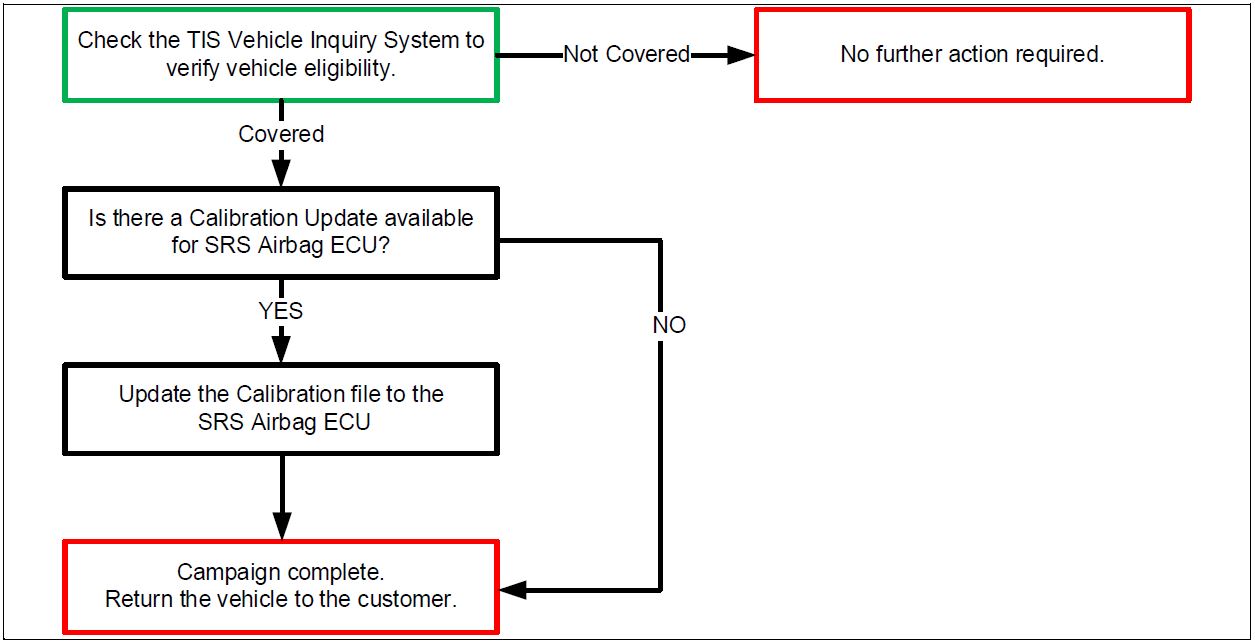
- Check the TIS Vehicle Inquiry System to confirm that each VIN is eligible for this Safety Recall, and that it has not already been completed prior to dealer shipment or by another dealer.
Note: TMNA warranty will not reimburse dealers for repairs completed on vehicles that are not affected or were completed by another dealer.
| III. PREPARATION |
1. PARTS
No parts will be necessary
2. TOOLS, SUPPLIES & EQUIPMENT
- Standard Hand Tools
- Techstream 2.0 / TIS Techstream / Techstream Lite
- GR8 Battery Diagnostic Station
- T-SB-0134-16
| IV. BACKGROUND |
| Due to inappropriate programming of the air bag electronic control unit (ECU), a fault may be erroneously detected and disable a front or side supplemental restraint system (SRS) sensor. If this were to occur, the air bag ECU may not appropriately identify a crash condition, the air bags may not deploy as intended, and as a result, may not meet some requirements of FMVSS No. 208 and 214. This could lead to an increased risk of injury in the event of a crash. |
| V. DETERMINE CALIBRATION UPDATE STATUS |
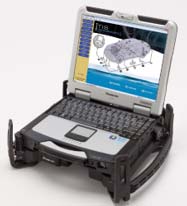
1. PERFORM HEALTH CHECK
a. Using a Techstream, perform a Health Check.
Note: This Safety Recall covers only the update to the SRS Airbag ECU, as detailed in these instructions. It does not cover the diagnosis or replacement of any other parts on the vehicle.
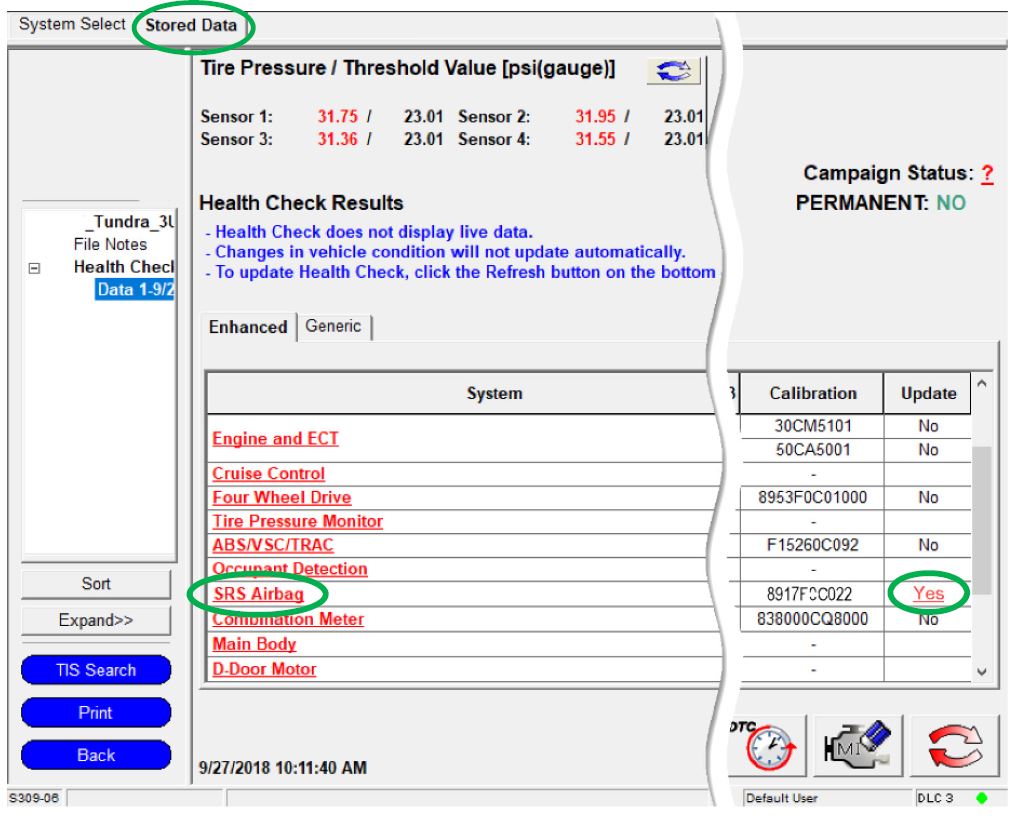
| 2. DETERMINE CALIBRATION UPDATE STATUS
a. Locate the Update column for the SRS Airbag ECU in the Stored Data b. Determine the status of an available update; indicated by a YES or NO. |
 |
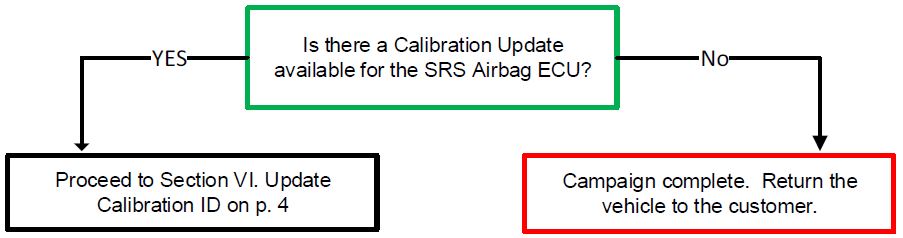
Note: If the SRS Airbag ECU already has the updated Calibration ID, the campaign is complete. No further action is required. Submit the warranty claim to complete this vehicle.
| VI. UPDATE CALIBRATION ID |
The ECU reprograming procedure is detailed in T-SB-0134-16. Reference this Bulletin for additional detailed procedures and information.
1. VEHICLE PREPARATION
a. Confirm the following conditions:
- Vehicle in the IG position (engine off).
- Transaxle in Park.
- Parking brake engaged.
- Turn off all electrical accessories (i.e. climate control, audio system, etc.)
- Headlight switch in the DRL OFF position.
- Windshield wiper switch in the OFF position.
2. CONNECT THE 12v BATTERY TO A POWER SUPPLY (GR8)
a. Connect the GR8 or other type of a power supply (not a battery charger) to the 12v battery.
b. Select the Power Supply Mode from the Charge Menu of the GR8.
| A power supply MUST be used during reprogramming. ECU damage will occur if the battery voltage is not properly maintained during this re-flash procedure. |
Note: A power supply must be connected directly to the 12v battery terminals and NOT the remote jump posts under the hood (if equipped).
3. VERIFY TECHSTREAM SETUP
a. Verify that the Techstream meets the following conditions:
- The latest version of software is loaded.
- The Techstream battery is fully charged. If not, connect the Techstream to a 120v source.
- The DLCIII cable is in good condition.
| The Techstream battery must be maintained during the update procedure. If necessary, plug the Techstream into a 120v outlet to ensure that a failure does not occur. |
Note: If the Techstream communication with the vehicle fails during the re-flash procedure, the SRS Airbag ECU will be damaged and must be replaced.
4. UPDATE THE CALIBRATION ID
a. Identify the current Calibration ID for the SRS Airbag ECU on the Stored Data
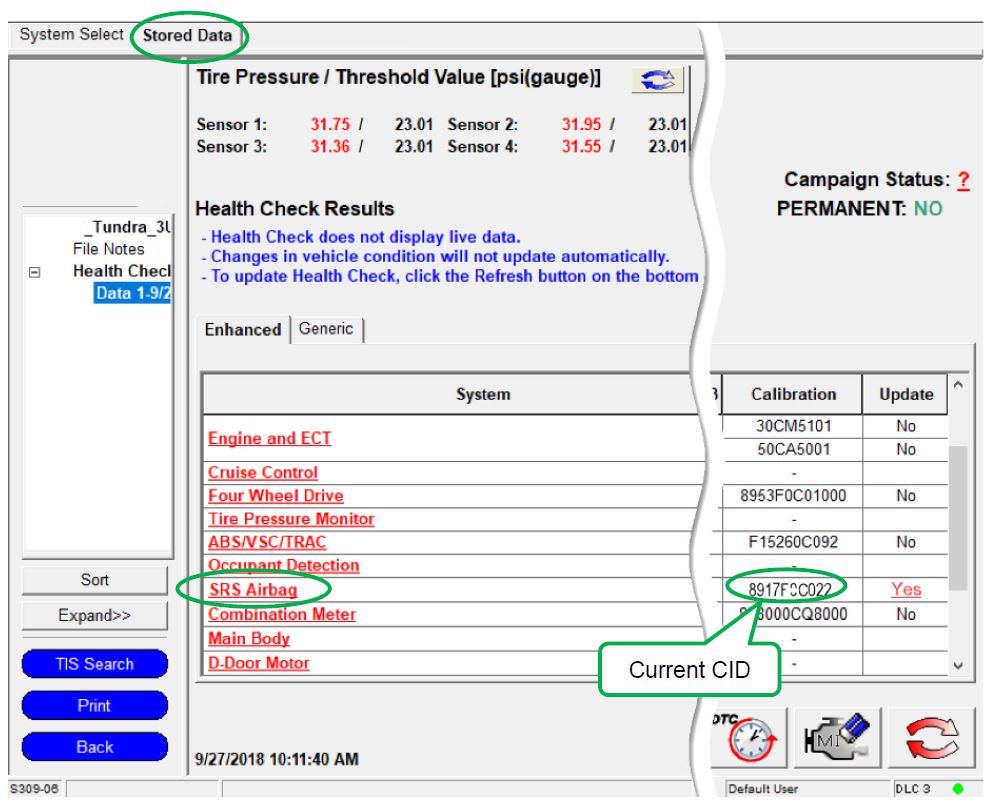 |
b. Locate the vehicles Current CID in the chart below.
c. Select the corresponding NEW CID link to load the update.
d. Follow the on-screen instructions to complete the ECU re-flash procedure.
The ECU reprograming procedure is detailed in T-SB-0134-16. Reference this Bulletin for detailed procedures and information.
| Vehicle Specification | SRS AIRBAG ECU Calibrations | ||
| Model | Trim | Current CID | New CID |
| Avalon | Gas | 8917F07132 | 8917F07190 |
| Hybrid | 8917F07142 | 8917F07200 | |
| Tundra | Crew Max | 8917F0C032 | 8917F0C035 |
| 8917F0C033 | |||
| 8917F0C034 | |||
| Double Cab | 8917F0C022 | 8917F0C025 | |
| 8917F0C023 | |||
| 8917F0C024 | |||
| Sequoia | All | 8917F0C042 | 8917F0C045 |
| Be extremely careful to select the correct NEW CID that corresponds to the Current CID of the vehicle. |
5. CHECK FOR DTCs
a. Perform a Health Check.
b. Clear DTC’s that may have set during the re-flash procedure.
c. Re-run the Health Check to confirm that no DTC’s reappear.
| ◄ VERIFY REPAIR QUALITY ► |
| − Confirm the ECM Calibration has been updated successfully to the NEW CID.
− If you have any questions regarding this Safety Recall, please contact your regional representative |
| VII. APPENDIX |
A. PARTS DISPOSAL
As required by Federal Regulations, please make sure all recalled parts (original parts) removed from the vehicle are disposed of in a manner in which they will not be reused, unless requested for parts recovery return.
| B. CAMPAIGN DESIGNATION DECORDER |
|
| Examples: C1B = Launched in 2012, Interim Phase, 2nd Campaign Launched in 2012 E0A = Launched in 2014, Remedy Phase, 1st Campaign Launched in 2014 H0A = Launched in 2017, Remedy Phase, 1st Campaign Launched in 2017. |
TECHNICAL INSTRUCTIONS
FOR
SAFETY RECALL J0X
SRS SENSOR SOFTWARE UPDATE
SAFETY (NONCOMPLIANCE) RECALL J0X (Remedy Notice)
October 5, 2018
NONCOMPLIANCE INFORMATION REPORT
October 4, 2018
Recall Acknowledgement
October 11, 2018
Reprogramming
Approved J2534 Devices only provide reprogramming capabilities and do not support diagnostic scantool functions. For full diagnostic capabilities, please consider TIS Techstream or Techstream Lite
Toyota, Scion, and Lexus ECMs can be reprogrammed with the TIS Techstream, Techstream Lite, Diagnostic Tester, or can also be reprogrammed using a Toyota validated J2534 interface. Vehicle recalibration requires the use of the following:
- TIS Professional Level Subscription
- Toyota Calibration Update Wizard software (installed along with Techstream Software)
- Personal Computer running Microsoft Windows XP/2000 or later operating system
Toyota strongly recommends USING ONLY VALIDATED INTERFACE DEVICES that appear on this list.
Toyota works closely with J2534 interface manufacturers to ensure that their hardware works safely and efficiently with our products. Every device listed on this page has been thoroughly tested and validated on Toyota, Scion, and Lexus vehicles.
It is important to understand that only the specific devices, firmware, DLLs and APIs listed here have been tested by Toyota. We do not recommend use of any other J2534 device, firmware, DLL or API that is not listed here. Changes to J2534 hardware/software is outside of Toyota's control; in some cases, changes made to device hardware/software can negatively impact reprogramming performance. Toyota makes every effort to continue to work with J2534 interface manufacturers to ensure continued product compatibility as our respective products evolve.
J2534 Approved Device Application Chart
| Device Name |
Supplier | Version | CUW Version |
Supported OS | ||
|---|---|---|---|---|---|---|
| Firmware* | DLL* | API* | ||||
| Flasher LT-Import | Bosch Diagnostics | 01.02.07 | 01.02.07 | 04.04 | 8.8 | B, C, D, E |
| Flasher PRO | Bosch Diagnostics | 01.09.18 | 01.09.18 | 04.04 | 8.8 | B, C, D, E |
| Mastertech VCI | Bosch Diagnostics | 13.0.75.27 | 2.0.75.27 | 04.04 | Testing in Progress | B, C, D, E |
|
VSI-2534 |
Dearborn Group | 1.112 | 2.05.22 | 04.04 | 8.10 | C, D |
| Drew Technologies | 01.09.18 | 01.09.18 | 04.04 | 8.8 | B, C, D, E | |
| Mongoose MFC | Drew Technologies | 01.02.07 | 01.02.07 | 04.04 | 8.8 | B, C, D, E |
| Drew Technologies | 1.1.12.0 | 1.1.12.0 | 04.04 | 8.16 | A, B, C, D | |
| Pass Thru Pro II | Snap-On | 01.09.18 | 01.09.18 | 04.04 | 8.8 | B, C, D, E |
*Original validated firmware/DLL versions may be superceded by the device manufacturer. Contact the device manufacturer if you are unable to find the versions listed above.
Supported Operating Systems
| A | Windows 8 (32-bit; 64-bit) |
| B | Windows 7 (32-bit; 64-bit) |
| C | Windows VISTA Home Basic, Home Premium, Business, Ultimate |
| D | Windows XP Pro SP1 or later |
| E | Windows 2000 SP2 or later |
For more information about the J2534 devices listed above, click on the vendor names. To report compatibility problems with listed hardware/software, please contact the device manufacturer.
Obtaining Calibration Files
The Flash Reprogramming Calibration CD is no longer available.
ECU Calibrations are now available for download directly from TIS. A valid TIS Professional Level subscription is required to access Calibration files. These files are compatible with the above mentioned scantools and J2534 interfaces. The Calibration page, located on the Diagnostics tab in the TIS site, contains all the most current vehicle calibration files, applicable Service Bulletins, and instructions for use. Select the following link for step by step instructions to access this page.
Note: Calibration Update Software is now included in the Techstream Software Installer. A valid TIS Professional Level subscription is required to download and install Techstream Software.

- J2534 Pass-Thru Programmer: TOPDON RLink J2534 is an advanced diagnostic and reprogramming tool that support all J2534 protocols, as well as D-PDU, CAN-FD and DoIP, ensuring compatibility with a wide range of modern vehicles. It offers extensive versatility with support for over 18 major automotive brands, including Chrysler, Ford, GM, Nissan, Toyota, Honda, Subaru, Land Rover/Jaguar, Volvo, Wuling, Volkswagen/Audi, Mercedes-Benz, and BMW. NOTE: Not compatible with Ford IDS diagnostic software
- All-in-One OEM Diagnostics: This J2534 ECU programming tool elevates your automotive repair capabilities to new heights by delivering complete OEM diagnosis. Boasting comprehensive full-system diagnostics, intuitive repair guides, advanced ECU programming and coding, common reset services, a vast library of repair information and more, this all-in-one solution empowers technicians to effortlessly tackle complex vehicle issues with ease. *Not compatible with 24V vehicles
- Proven Performance You Can Trust: Backed by over 10000 real vehicle tests and benefit from a wealth of practical experience, this OEM reprogramming tool guarantees stable and exceptional performance. Supported by TOPDON's dedicated technical experts with in-depth knowledge of both auto repair and J2534 Pass-Thru programming, the RLink J2534 provides prompt and professional assistance, ensuring a smooth setup and reliable compatibility
- Integrated Excellence, Always Up-to-Date: Featuring the exclusive RLink Platform to provide a streamlined experience with one-click driver installation and management, ensuring flawless integration with your OE software, maintaining the original performance quality. The built-in operation guide makes mastering OE software quick and easy, so you can get started right away. Plus, with lifetime free updates, your diagnostics will stay current with the latest drivers and innovations
- Efficiency Meets Versatility: Engineered to support three CAN channels simultaneously - CAN FD and CAN-CC included, giving you the edge in fast troubleshooting. To perfectly synchronized with the OE software, please diagnose with active subscriptions and make sure your computer system is running a compatible 64-bit Windows version (7, 8, 10 or later) to fully leverage the power of RLink J2534. *We don't provide extra OE software

- Advanced VCI Box, Industry-leading J2534 Pass-Thru Technology: This J2534 Pass-Thru Programmer is designed espically for technicians, independent shop owners, and DIY enthusiasts, enables fast, reliable computer-based programming. It supports all J2534 protocols—including the latest DoIP and CAN FD—ensuring full compatibility with both legacy and next-generation vehicles.
- High-Speed OEM-Level Diagnostics & Programming: Unlock true OEM functionality with comprehensive system diagnostics, guided troubleshooting, coding, adaptations, resets, and programming—all designed to slash repair time. This all-in-one tool eliminates the need for multiple OEM devices, boosting efficiency and cutting costs. Equipped with High-Speed USB, it delivers 10x more data per second than competing solutions
- Coverage for 17 Car Brands & Ultra Reliability: Works seamlessly for Chrysler, for Ford(Forscan), for GM, for Nissan, for Toyota, for Honda, for Subaru(SSM4), for Land Rover/Jaguar, for Volvo, for Wuling, for Volkswagen, for Mercedes-Benz, and for BMW. Backed by over 10000 real vehicle tests and benefit from a wealth of practical experience, this OEM reprogramming tool guarantees stable and exceptional performance
- User-Friendly RLink Platform & Expert Support: TOPDON’s proprietary driver management platform offers a clean interface and lifetime free updates. Access a rich library of real-world case studies to stay ahead of the curve. Backed by a support team with 10+ years of J2534 and automotive repair experience, we provide one-on-one assistance to resolve any technical issue.
- 6.6 ft USB-C Cable & Portable Storage Case: The RLink J2534 diagnostic tool features a 6.6ft USB 2.0 Cable and a 1.2 ft OBDII Extension Cable, allows to connection your computer easily outside the vehicle. The included handled carry case offers easy portability, storage, and hanging options—keeping your gear clean and ready to go, anywhere.

- Dual WiFi & 10.1" Touchscreen: Provides a stable, high-speed wireless link 3x faster than bluetooth, and a responsive, professional interface. Topdon ONE obd2 scanner diagnostic tool ensures smooth, non-lagging diagnostic scan, boosting mechanic efficiency
- J2534 Pass-Thru Support: The included ONE VCI supports the J2534 standard, allowing it to function as a pass-thru device when paired with OEM diagnostic software.Through TOPDON’s RLink platform, technicians can perform dealer-level coding, expanding in-house capabilities without investing in multiple factory automotive scan tools
- OE Topology Mapping: Visualize the vehicle’s ECU network exactly as it’s built.Zoom, pan, and highlight specific modules to pinpoint component issues with precision.Topology mapping displays real-time communication between modules
- 50+ Service Functions: Covers high-demand services like ADAS calibration, DPF regen, TPMS reset, ABS bleed, and throttle adaptation.Expands your service menu, allows you to charge premium rates, and turns away zero jobs due to lack of tooling. Vehicle-specific functionality may vary
- Advaned ECU Coding: 10 of the most serviced brands in North America, including full ECU coding and flash hidden support for BMW, VW, Au-di, Benz, Porsche, Toyota, Ni ssan and more. Enables module replacement, feature customization, and personal settings with automatic backup or restore.Lets your shop safely offer high-margin customization services, attracting more customers and boosting profit

- [J2534 Pass-Thru Programmer] - TOPDON RLink J2534 is engineered for professional technicians, delivering OEM diagnostic and reprogramming capabilities. It supports all J2534 protocols, CAN-FD, DoIP, D-PDU. Compatible with 17 vehicle brands—such as Chrysler, Ford, GM, KIA, Hyundai, Nissan, Toyota, Honda, Subaru, Mitsubishi, MAZDA, Land Rover/Jaguar, Volvo, Volkswagen/Audi, Mercedes-Benz, and BMW. RLink J2534 can help reduce the cost of purchasing equipment from different brands.
- [All-in-One OEM Reprogramming and Diagnostics] - When seamlessly integrated with OEM diagnostic software, this dongle enables you to perform a wide range of functions, including ECU programming and coding, DTC reading and clearing, active tests, component matching, adaptations, rewriting, guided troubleshooting, and more. This all-in-one tool eliminates the need for multiple OEM devices, significantly boosting work efficiency.
- [Tested, Trusted, and Proven for Accuracy] - TOPDON RLink J2534 is renowned for its reliability, having successfully completed over 10,000 real-vehicle tests. The wealth of data and hands-on experience behind it ensures consistent performance and accurate results. You can trust this tool to deliver optimal performance.
- [One-Click Installation, Continuous Updates] - The exclusive TOPDON RLink platform streamlines installation with a one-click driver setup, allowing you to quickly access OEM software for diagnostic and reprogramming tasks. With lifetime free updates, your RLink J2534 stays current without any additional cost, ensuring reliable performance for the long term. *We don't provide extra OE software.
- [Works with Windows Compatibility and OEM Software Subscription] - The RLink J2534 supports three CAN channels - including CAN FD and CAN-CC, providing advantages in the process of rapid troubleshooting. Compatible with Windows 7, 8 and 10 (64-bit) and higher versions of the system. For full functionality, an active OEM software subscription is required for each supported vehicle brand. Please note that the dongle does not include OEM software, which must be purchased separately to access brand-specific diagnostic and reprogramming features.
- 💯【Conta.ct us for Support Directly】For any issues experienced after purchase, please reach out to: 📞autelsupply@ outlook. com🛣️. Our team will provide perfect solution for you. For tech support or [explore additional accessory], please cont.act our team: 📞autelsupply@ outlook. com🛣️.
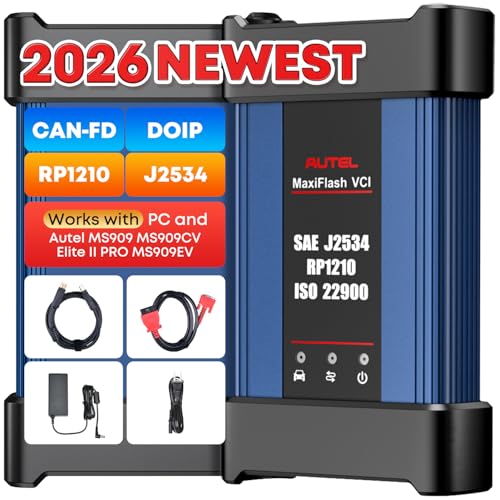
- 🌎【Autel J2534 Pass-Thru Progra.mmer】As an OEM Pass-Thru Progra.mmer Vehicle interface for multiple makes, Autel MaxiFlash J2534 support all J2534 protocols, D-PDU, CAN-FD and DoIP protocols. 2026 newer Autel MaxiFlash J2534 VCI can works with P-C and download OEM vehicle software, seamlessly conduct OE-level diagnostic-progra.mming-c0ding. Also, Work with Elite II Pro/ Ultra Lite/ MS909/ MS909CV/ MS909EV to directly pro.gram on Merce.des-Be.nz & BM.W. Autel J2534 Progr.ammer is a multi-functional device and supports 10+ major brands, including for Hond.a, G.M, LandRo.ver, BM.W, Chrysl.er, For.d, Hyun.dai, Ki.a, Merc.edes B.enz, Toyot.a, Volksw.agen etc.
- 🌎【Enhanced Protocol: J2534/D-PDU/RP1210/CAN FD/DoIP】Autel MaxiFlash JVCI is a blueto.oth communicate device, it supports latest CAN FD DoIP CAN protocols, compliant with automotive D-PDU/ J2534/ RP1210 standards. It can perform standard PassThru J2534 functions: compatible with Toyota Techstream, Volvo VIDA, Honda HDS, Jaguar Land Rover IDS and BM.W 3G for OEM diagnostics. CAN FD protocol is mainly for GM 2019+, DoIP protocol is mainly for Volvo 2018+, for L-and Rover/for Jaguar 2017+, for BM.W F chassis and G chassis.
- 🌎【Compatible with P-C/ WIND.OWS 】The Autel J2534 VCI can be connected to a compu.ter via a data cable; once the corresponding OEM software is installed, it enables do advanced progr.amming and c0ding on your vehicles. Easy Steps: 1) Connect to P-C via a USB cable 2) download OEM vehicle software 3) Start Diagnose. Take For.d for example, you can download OEM software on mot.orcraft.erservi.ce website, such as: For.d Diagnostic Software downloads, As B.uilt Data, Updated Cali.bration information, then use different software do relevant features.
- 🌎【Work with Autel Elite II Pro/ Ultra Lite/ MS909/ MS909CV/ MS909EV】This 2026 latest Autel J2534 Pass-Thru VCI is 100% compatible with Autel Elite II Pro Ultra Lite MS909 MS909CV MS909EV to perform advanced functions from diagnose to progra.mming.
- ALL OF THE J2534 PROTOCOLS - This single unit has all of the protocols you need for your OEM J2534 reprogramming and diagnostics including the latest in DoIP and CanFD
- J2534 TECHNICAL SUPPORT - FREE for the life of the tool. Staffed by technicians who understand vehicle repair and J2534 Pass‑thru
- TOOLBOX WITH OEM APPLICATION DESCRIPTIONS - educational video tutorials and real-time news – Giving you the confidence and up-to-date knowledge to get the job done
- J2534 v05.00 API - The newest version of J2534 to give you the latest in pass-thru technology
- FUTURE PROOF WITH 4 CAN CHANNELS - Going beyond the 3 required by select Chrysler/FCA models, CarDAQ-Plus 3 also provides a 4th to meet the needs of future OEM applications
This product presentation was made with AAWP plugin.