
TECHNICAL INSTRUCTIONS
FOR
SAFETY RECALL J0A, J0B, J0C
FRONT PASSENGER AIRBAG “MODULE” REPLACEMENT ONLY
CERTAIN 2003 – 2004 MODEL YEAR MATRIX
The repair for 2005 – 2008 Matrix can be found on TIS in the 2005 – 2008 Technical Instructions
UPDATE 11-15-2019
Update 11-15-19
- The repair for 2005 – 2008 Matrix is now available. Please see the 2005 – 2008 Technical Instruction on TIS
Update 08-28-19
- The repair for 2005 – 2008 Matrix is not available at this time
Update 06-17-19
- The Airbag Scanning Process has been updated
Update 07-17-18
- The Technician Certification Requirements have changed
BACKGROUND
The subject vehicles are equipped with front passenger airbag inflators which may have been manufactured in such a way as to have a potential for the intrusion of moisture over time. Depending on the circumstances, this could create excessive internal pressure when the airbag is deployed and cause the inflator to rupture. In the event of an inflator rupture, metal fragments could pass through the airbag cushion material, striking the vehicle occupants and potentially resulting in serious injury or death.
PARTS
Applicable for: The Continental U.S. 48 States Only
| Model | Part Number | Part Description | Quantity | ||
| 03-04 Matrix | 04005-22601 | Instrument Panel Airbag Kit* | 1 | ||
*The kit above includes the following parts.
| |||||
| Matrix | 04005-28112 | IP Wire Harness Kit* | 1 | ||
*The kit above includes the following parts.
| |||||
Applicable for: Alaska, Hawaii and USTT Locations Only
| Model | Part Number | Part Description | Quantity | ||
| 03-04 Matrix | 04005-22501 | Instrument Panel Airbag Kit* | 1 | ||
*The kit above includes the following parts.
| |||||
| Matrix | 04005-28112 | IP Wire Harness Kit* | 1 | ||
*The kit above includes the following parts.
| |||||
SEOCONTENT-START
IMPORTANT UPDATE
TECHNICAL INSTRUCTIONS
FOR
SAFETY RECALL J0A, J0B, J0C
FRONT PASSENGER AIRBAG “MODULE” REPLACEMENT ONLY
CERTAIN 2003 – 2004 MODEL YEAR MATRIX
The repair for 2005 – 2008 Matrix can be found on TIS in the 2005 – 2008 Technical Instructions
UPDATE 11-15-2019
Update 11-15-19
– The repair for 2005 – 2008 Matrix is now available. Please see the 2005 – 2008 Technical Instruction on TIS
Update 08-28-19
– The repair for 2005 – 2008 Matrix is not available at this time
Update 06-17-19
– The Airbag Scanning Process has been updated
Update 07-17-18
– The Technician Certification Requirements have changed
All dealership technicians performing this recall are required to successfully complete the most current version of the E-Learning course “Safety Recall and Service Campaign Essentials”. To ensure that all vehicles have the repair performed correctly; technicians performing this recall repair are required to have successfully completed E-Learning course SC18A (if you had previously completed E-Learning Course SC13B, you do not have to take SC18A), in addition to “Safety Recall and Service Campaign Essentials”, and currently hold at least one of the following certifications levels:
• Toyota Certified (Electrical)
• Toyota Expert (Any Specialty)
• Master
• Master Diagnostic Technicians
It is the dealership’s responsibility to select technicians with the above certification level or greater to perform this repair. Carefully review your resources, the technician skill level, and ability before assigning technicians to this repair. It is important to consider technician days off and vacation schedules to ensure there are properly trained technicians available to perform this repair at all times.
2
I. OPERATION FLOW CHART
The flow chart is for reference only. DO NOT use it in place of the full technical instructions. Follow ALL steps as outlined in the full technical instructions to confirm the campaign is completed correctly.
CoveredCampaign completed, return the vehicle to the customerVerify Vehicle Eligibility1. Confirm vehicle VIN matches the R.O.2. Check the TIS Vehicle Inquiry SystemNot CoveredNo further action requiredDocument the airbag assembly serial numbers as instructed in the technical instructions Install the NEW airbag assemblyRemove the original airbag assembly
3
II. BACKGROUND
The subject vehicles are equipped with front passenger airbag inflators which may have been manufactured in such a way as to have a potential for the intrusion of moisture over time. Depending on the circumstances, this could create excessive internal pressure when the airbag is deployed and cause the inflator to rupture. In the event of an inflator rupture, metal fragments could pass through the airbag cushion material, striking the vehicle occupants and potentially resulting in serious injury or death.
III. IDENTIFICATION OF AFFECTED VEHICLES
• Check the TIS Vehicle Inquiry System to confirm the VIN is involved in this Safety Recall, and that the campaign has not already been completed prior to dealer shipment or by another dealer.
• TMS warranty will not reimburse dealers for repairs conducted on vehicles that are not affected or were completed by another dealer.
IV. PREPARATION
A. PARTS
Applicable for: The Continental U.S. 48 States Only
Model
Part Number
Part Description
Quantity
03-04 Matrix
04005-22601
Instrument Panel Airbag Kit*
1
*The kit above includes the following parts.
Airbag Module
1
Matrix
04005-28112
IP Wire Harness Kit*
1
*The kit above includes the following parts.
Wire Harness
1
Applicable for: Alaska, Hawaii and USTT Locations Only
Model
Part Number
Part Description
Quantity
03-04 Matrix
04005-22501
Instrument Panel Airbag Kit*
1
*The kit above includes the following parts.
Airbag Module
1
Matrix
04005-28112
IP Wire Harness Kit*
1
*The kit above includes the following parts.
Wire Harness
1
4
B. TOOLS & EQUIPMENT
• Standard hand tools
• Torque wrench
• Molding remover set
• Techstream
OPTIONAL SST – This is an essential special service tool that the dealership should have. This tool is not mandatory when performing this repair.
Part Number
Part Name
Quantity
09890-47010-01
Anti-Static Mat Set
1
DSF CAMPAIGN TOOLS – This tool was provided to the dealership for campaign D0F and will be used for campaign DSF. This tool is required when performing this repair.
Image
Name
Quantity
Barcode Scanner
1
NOTE: This tool CANNOT be ordered through the parts or tools system. There is a very limited supply of tools, but if additional tools are needed, contact your regional representative.
V. COMPONENTS
5
VI. SAFETY PRECAUTIONS
CRITICAL INFORMATION – READ THOROUGHLY
Failure to follow these procedures correctly could cause the SRS to unexpectedly deploy during servicing or the SRS may fail to operate correctly when required after reassembly. Confirm all work is performed as described in these instructions.
1. ELIMINATE STATIC ELECTRICITY
a) Before starting work and periodically while working on the vehicle, touch a metallic part of the vehicle to discharge static electricity in the body.
2. DO NOT MEASURE RESISTANCE
a) DO NOT measure resistance of airbag components, this may cause accidental activation.
3. HANDLE THE AIRBAG CAREFULLY
a) If an inflator is dropped, replace it with a NEW inflator.
4. WEAR PROTECTIVE EQUIPMENT
a) Always wear appropriate protective equipment when working on the SRS.
6
VII. SRS SYSTEM HEALTH CHECK
1. PERFORM A HEALTH CHECK
a) Confirm the Techstream is connected to the dealership’s internet.
b) When launching the Techstream software the VIN MUST be entered manually.
NOTE: All letters of the VIN MUST be entered in ALL CAPS, or the VIN will need to be reentered when running the diagnostic report.
c) Perform a health check.
• The VIN MUST be entered manually in ALL CAPS when launching the Techstream software, the VIN MAY NOT auto-populate due to vehicle age.
• The serial number recording application will be disabled and the repair cannot be completed if a health check and diagnostic report is not performed and recorded by TMS.
VIII. WORK AREA PREPARATION
CRITICAL INFORMATION – READ THOROUGHLY
The anti-static mat set that is an essential SST may be available at your dealership and is optional to use during inflator replacement. If the anti-static kit is not available, before starting work and periodically while working on the vehicle, touch a metallic part of the vehicle to discharge static electricity in the body.
If the anti-static kit is not available, before starting work and periodically while working on the vehicle, touch a metallic part of the vehicle to discharge static electricity in the body.
7
Campaign Phase Interpretation
REMEDY PHASE – ELIGIBLE FOR REPAIR
STATUS IDENTIFICATION
A: Campaign Status: Remedy Available
B: Memo: Remedy Available
• This vehicle is eligible to have the remedy performed if the completion status is “Not Completed.”
• The original scanning application link can be used.
STATUS IDENTIFICATION
A: Campaign Status: Remedy Available
B: Memo: Remedy Available – Instead of using the scanning application use https://takata-scan-app.imagespm.info/
• This vehicle is eligible to have the remedy performed if the completion status is “Not Completed.”
• The new scanning application website https://takata-scan-app.imagespm.info/ must be used when performing the remedy.
• Login instructions for this new scanning application website are included in the Technical Instructions.
A
B
A
B
8
IX. PASSENGER AIRBAG INFLATOR REPLACEMENT
1. LAUNCH THE SERIAL NUMBER RECORDING APPLICATION
• The NEW MODULE serial numbers MUST be recorded using the barcode scanner (provided at the launch of SSC D0F).
• The barcode scanner application MUST be completed on every vehicle. These numbers MUST be included on every warranty claim that is submitted for inflator module replacement or the claim may be subject to debit.
• The technician performing the work MUST have valid TIS login credentials and an internet connection to perform the inspection and scanning process.
a) Log in to TIS and input the VIN of the vehicle in the Vehicle Inquiry tab.
b) Confirm the VIN is applicable and that the campaign has not been completed.
c) Click on the link to launch the serial number recording application.
d) Reenter TIS password in the serial number recorder application.
NOTE: The person logged-in to TIS MUST be the person performing the repair.
e) Record the vehicle mileage into the serial number recording application.
NOTE:
• A task status screen will populate next and at other intervals during the repair. This screen will indicate if the module was replaced or in some limited cases that the entire airbag assembly was replaced. Click ‘next’ to proceed to the next step. This information will be used for record keeping by TMS.
• If this screen indicates that the inflator has already been replaced on this VIN, there is no need to perform the campaign again.
E04
9
2. REMOVE THE GLOVE BOX
a) Open the glove box door.
b) Press in on both sides of the door and swing it down to remove it from the vehicle.
3. REMOVE THE AIRBAG ASSEMBLY
a) Disconnect the negative battery cable.
• Wait at least 90 seconds after disconnecting the cable from the negative battery terminal to prevent airbag and seat belt pre-tensioner deployment.
• Follow all precautions as outlined on TIS before servicing the SRS system.
b) Disconnect the airbag connector.
4. REMOVE THE FRONT PASSENGER AIRBAG
a) Remove the 2 nuts and release the 6 clips.
b) Remove the airbag assembly.
5. CONNECT THE BARCODE SCANNER
a) Connect the barcode scanner to the USB port on the Techstream.
b) The scanner will automatically connect and a beep will be heard when the scanner is ready.
NOTE:
• The scanner was provided for SSC D0F.
• The scanner works best in low light conditions.
• Always hold the scanner directly in front of and parallel to the barcode label.
10
6. SCAN THE AIRBAG SERIAL NUMBER
a) Check the box as shown below.
Note: Do not contact your region for this procedure.
CRITICAL INFORMATION – READ THOROUGHLY
• Because this new part is a complete airbag assembly with a different style inflator installed, you do not need to record the old or new inflator serial numbers.
Note: The old tube style inflator may still be available. If you have that part you need to refer to the old set of instructions which will require the old and new inflators to be recorded.
• The New 12 digit Airbag Serial number on the side of the assembly will need to be recorded
• To record the new Airbag Serial number, in the scanning application you will need to check the box indicating the original airbag assembly serial number is not readable or missing. This will take you to the screen that allows you to enter the new airbag serial number.
1NX BR32E 00000000 (2003 Corolla, Beige)
11
Scan the New Airbag Assembly Serial Number
a) Confirm the cursor is in the serial number box
b) Scan the replacement module serial number
c) Click next.
The new AIRBAG MODULE serial number MUST be recorded prior to reinstallation to track the airbag assembly to the vehicle.
d) Record the Warranty Authorization # to be included in the warranty claim.
e) Place the old module in the parts box and take it immediately to the parts department.
NOTE:
• Confirm the cursor is in the correct serial number input box before scanning.
• If the serial number barcode will not scan, it can be entered manually.
• If there are any difficulties or concerns with this process, email Quality_compliance@toyota.com with details.
12
X. MODULE REPLACEMENT
1. WORKING WITH AIRBAG
a) Carefully place the airbag on the bench inflator side up.
NOTE: Place clean sheet(s) of paper on the bench to protect the airbag.
b) Avoid standing directly over the inflator.
CRITICAL INFORMATION – READ THOROUGHLY
Remember to periodically touch a metallic part of the vehicle to discharge static electricity in the body if the anti-static kit is not being used.
2. TOOL PREPARATION
a) Wrap a screwdriver with tape.
13
3. REMOVE THE COVER
a) Gently insert the screwdriver between the airbag door and module and disengage the claws holding the door to the module. Please refer to the video below.
VIDEO
b) After all the claws have been disengaged separate the module from the door.
c) Mark the old module so it is not reused.
d) Inspect the door for damage to the mounting slots.
4. INSTALL THE NEW MODULE
a) Carefully slide the new module into the airbag door.
NOTE: Mounting direction.
14
b) Reengage the tangs of the module into the door using the screwdriver with the shaft wrapped in tape.
c) Connect the new harness to the new module.
d) Press the lock tab down.
XI. FRONT PASSENGER AIRBAG ASSEMBLY INSTALLATION
1. REINSTALL THE AIRBAG ASSEMBLY
Note: During reinstallation of the airbag assembly, ensure the 12mm bolt and two 10mm nuts securing the airbag assembly to the instrument panel are installed and torqued to the required specification identified on TIS.
a) Refer to TIS for instructions on airbag installation:
Matrix
2003-2004MY
2. RECONNECT THE NEGATIVE BATTERY CABLE
3. PERFORM A HEALTH CHECK AND DIAGNOSTIC REPORT
15
◄ VERIFY REPAIR QUALITY ►
− Confirm all precautions are follow to ensure safety during the repair
− Confirm the entire serial number checker application is completed and the warranty authorization # is recorded on EVERY vehicle
− Confirm the old module is handled safely and given to the appropriate parts professional for shipment
− Confirm the new harness connector is fully engaged and routed correctly.
If you have any questions regarding this update, please contact your regional representative.
XII. APPENDIX
A. CAMPAIGN DESIGNATION DECODER
C0TYear Campaign is Launched8 = 20089 = 2009A = 2010B = 2011C = 2012 D = 2013E = 2014F = 2015Etc…Repair Phase1st Campaign = A2nd Campaign = BEtc…Current Campaign Letter for this year 0 = Remedy1 = Prelim/Interim 2 = Prelim/Interim for Phase 2 Vehicles(Remedy not yet available) “1 or 2” will change to “0” when the Remedy is available
B. CAMPAIGN PARTS DISPOSAL
ALL inflators that are removed from vehicles under this campaign MUST be packaged and shipped back to the inflator manufacturer following the manufacturer’s instructions. The instructions can be found in the following locations:
• Attached to the dealer letter
SEOCONTENT-END
Remedy Instructions and TSB
RCRIT-19V741-3349.pdf 1148.119KB

- [Easy to Use—Work Out of the Box] + [FOXWELL 2026 New Version] FOXWELL NT604 Elite scan tool is the 2026 new version from FOXWELL, designed for car owners who want to figure out the cause of issues before fixing car problems by scanning common systems like ABS, SRS, engine, and transmission. The NT604 Elite obd2 scanner diagnostic tool comes with the latest software—no need to waste time downloading software first. Plug the scanner into the OBDII port with OBDII cable to start the diagnosis.
- [Affordable] + [Reliable Car Health Monitor] Will you be confused what happens when the warning light of ABS/SRS/transmission/check engine flashes? Instead of taking your cars to dealership, this FOXWELL scanner will help you do a thorough scanning and detection for your cars and pinpoint the root cause. Note:The device is a diagnostic tool, not a repair tool. To turn off a warning light, you must first physically repair the issue causing it. Only then can the scanner be used to clear the corresponding fault code.
- [5 in 1 Car Diagnostic Scanner] Compared with obd scanners (50-100), NT604 Elite code scanner not only includes their OBDII diagnosis but also serves as ABS/SRS scanner, transmission and check engine code reader. When it’s an odb2 scanner, you can use it to check if your car is ready for annual test through I/M readiness menu. In addition, live data stream, built-in DTC library, data play back and print, all these features are a big plus for it. Note: doesn't support maintenance functions like reset or relearn. For the SRS system, NT604 Elite can read and clear common fault codes not caused by a crash, but crash/collision data cannot be cleared.
- [Fantastic AUTOVIN] + [No extra software fee] Through the AUTOVIN menu, this NT604 Elite car scanner allows you to get your V-IN and vehicle info rapidly, no need to take time to find your V-IN and input one by one. What's more, the NT604 Elite ABS SRS scanner supports 60+ car brands from worldwide (America/Asia/Europe). You don’t need to pay extra software fee. AUTOVIN may not work on some older vehicles or certain vehicle brands. If AUTOVIN fails, please input the vin code manually or go to the Diagnostic Menu to select your vehicle model.
- [Solid protective case KO plastic carrying bag] + [Lifetime update] Almost all same price-level car scanner diagnostic tool only offers plastic bag to hold the scanner.However, NT604 Elite automotive scanner is equipped with solid protective case, preventing your obd2 scanner from damage. Then you don’t need to pay extra money to buy a solid toolbox.

- OBD2 SCANNER FOR ALL SYSTEMS – The INNOVA SD35 is a tablet-based OBD2 scanner designed for advanced diagnostics. Read and clear check engine light, ABS, SRS, and TPMS codes, plus test your car battery and alternator to prevent unexpected failures. Vehicle coverage may vary. Please use Innova’s Coverage Checker to verify compatibility.
- ALL-SYSTEM DIAGNOSTICS & LIVE DATA – Unlike basic code readers, this OBD2 scanner for all vehicles scans engine, transmission, ABS, SRS, and more. Get real-time live data, including RPM, fuel trims, temperature readings, and oxygen sensor performance.
- OBD2 TABLET WITH USER-FRIENDLY INTERFACE – This automotive scan tool features a high-resolution display, making vehicle diagnostics faster and easier.
- ADVANCED TPMS, OIL RESET & SERVICE FUNCTIONS – Perform TPMS sensor checks, oil light reset, and other service resets with ease This professional diagnostic tool provides comprehensive vehicle maintenance capabilities in one device.
- WIDE VEHICLE COVERAGE (1996 & NEWER CARS & TRUCKS) – This OBD2 scanner Bluetooth tablet is compatible with Toyota, Ford, Honda, Chevrolet, Nissan, Dodge, and more. However, feature coverage may vary. Please use Innova's Coverage Checker to verify coverage.
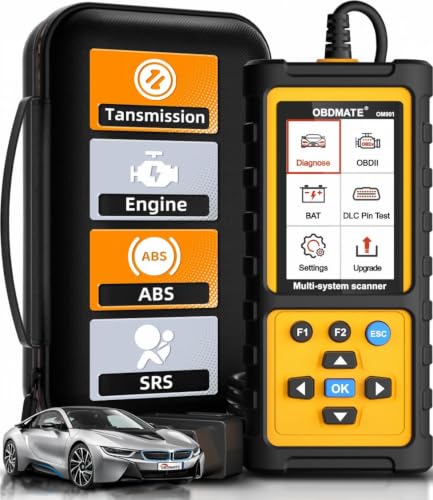
- 【Reset ABS/SRS/Transmission/Engine Lights】 More than an check engine code reader, OBDMATE OM901 obd2 scanner performs comprehensive diagnostics for the 4 most-used systems (ABS/SRS/Engine/Transmission). It quickly clears fault codes, turns off warning lights, read data stream and auto VIN.
- 【3.5" Handheld Scanner with 4 System Diagnose】 3.5" Super large TFT screen equipped displays an intuitive menu and clear readings of various sensors from ABS, SRS, ECM and TCM systems. It arrived with a silicone protective case and hard-shell carrying case, ensuring long-lived durability and drop resistance. The car diagnostic tool is plug-to-play designed, plug it and get diagnosis started without any batteries or updates required.
- 【One-Click I/M Readines&Full OBD2 Functions】 Press F1 to get an intuitive corloured form about whether various emissions-related systems on the vehicle are operating properly. Help you get smog-check ready quickly. OM901 car scanner supports all essential OBD2 functions you need: read & clear codes, view freeze frame, read I/M readiness, retrieve VIN, live data stream (with graphing display), O2 sensor test, onboard monitoring mode, and EVAP leak test.
- 【Battery Voltage Check&DLC Pin Test】 It allows you to monitor battery health by testing current battery voltage. Plus, this obd2 diagnostic tool features DLC 16-PIN test to check current voltage of every pin.
- 【Automotive Scanner Diagnostic Kit】 The package comes with 1 car scanner, 1 USB-type c cable, 1 hard storage bag and 1 user manual(en). Free to update without any hidden fees. 5 languanges available in setting including English, French, Italian, German and Espanish. Valuable and Portable, making it a great tool kit for car owners, DIY enthusiasts, and professional mechanics.
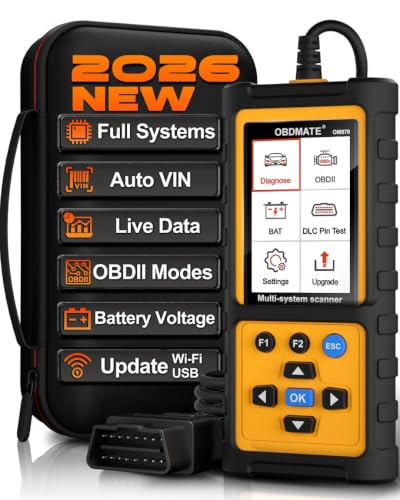
- 【Full Systems Automotive Diagnostic】 More than checking engine, ABS and SRS, OBDMATE OM970 obd2 scanner performs comprehensive diagnostics on all electric modules. It quickly scans and clears fault codes, turns off warning lights, reads live data, and features Auto-VIN technology.
- 【Live Datastream&4-in-1 Graph】 Easily view live sensor data such as RPM, fuel trims, ATF temperature, wheel speed sensor, battery voltage and so on. OM970 scan tool also supports 4-in-1 trend graphing. Spend just 3 minutes to check – and you'll know exactly what's going wrong, helping you avoid hundreds in dealership diagnostic fees.
- 【One-Click I/M Readiness&Full OBD2 Functions】 Press F1 to get an intuitive corloured form about whether your vehicle's emissions-related systems are operating properly. Help you get smog-check ready quickly. OM970 obd2 diagnostic tool supports all essential OBD2 functions you need. Plus, it features battery voltage test and DLC 16-PIN test.
- 【Straightforward Menus with Easy Navigation】 All functions are easy to understand without obscure decriptions. 3.5" Large screen delivers clear readings while keeping one-hand operation. The car diagnostic tool comes with a silicone protective case and a hard-shell carrying case, ensuring long-lived durability and drop resistance.
- 【Budget-Friendly, No Subscriptions, Free Software Updates】 Plug and play: no bluetooth pairing, monthly fees, Wi-Fi connection, or any other troublesome initial settings. OM970 obd2 scanner works out of the box with the latest software. Lifetime free upgrade.
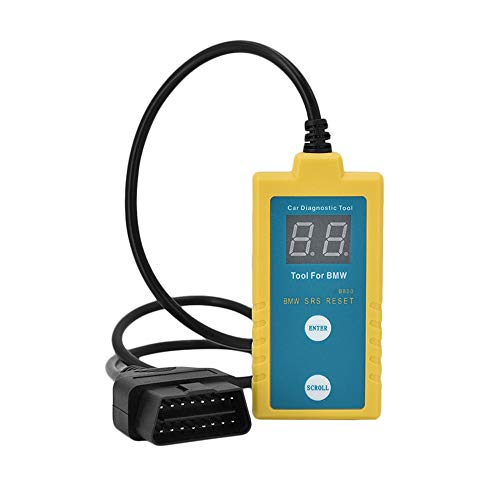
- ✔️【Professional SRS Reset for 1994-2003 BMW】 Designed specifically for classic BMW models (1994-2003). This B800 scanner reads & clears SRS airbag fault codes, turns off the warning light, and saves you a costly dealer visit. Confirmed compatible with: E36, E46 (EXCEPT 2001 330i), E34, E38, E39, Z3, and X5 (E53). NOT compatible with any BMW built before 1994 or after 2003.
- ✔️【Important: Two Different Connection Ports – Read Before Use】 To avoid “not working” issues, please note: For 1994–2000 BMWs (most E36, E34, Z3, early E39), the SRS diagnostic port is a round 20-pin connector under the hood. You MUST use the included 16-pin to 20-pin adapter cable. For 2000–2003 models (late E46, E39, X5), use the standard OBD-II port inside the cabin. Incorrect connection is the #1 reason for “incompatibility” reports.
- ✔️【Read & Clear Fault Codes in Minutes】 Quickly diagnose why your SRS light is on. The scanner accurately reads fault codes from airbag and seatbelt pretensioner systems. With one button press, clear the codes and reset the SRS warning light in seconds. No expensive dealer tools needed.
- ✔️【User-Friendly for DIYers – No Mechanic Required】 Easy operation with an intuitive button layout: ‘Enter’ to confirm, ‘Scroll’ to navigate. The clear LCD screen shows results instantly. Includes a step-by-step manual (revised for clarity) to guide you through the entire reset process.
- ✔️【Reliable Support with 1-Year Warranty】 We stand behind the quality of our B800 scanner. It comes with a 1-Year Hassle-Free Warranty. If you have any questions or need support, please contact us with your Order ID, and our dedicated team will assist you promptly.
This product presentation was made with AAWP plugin.