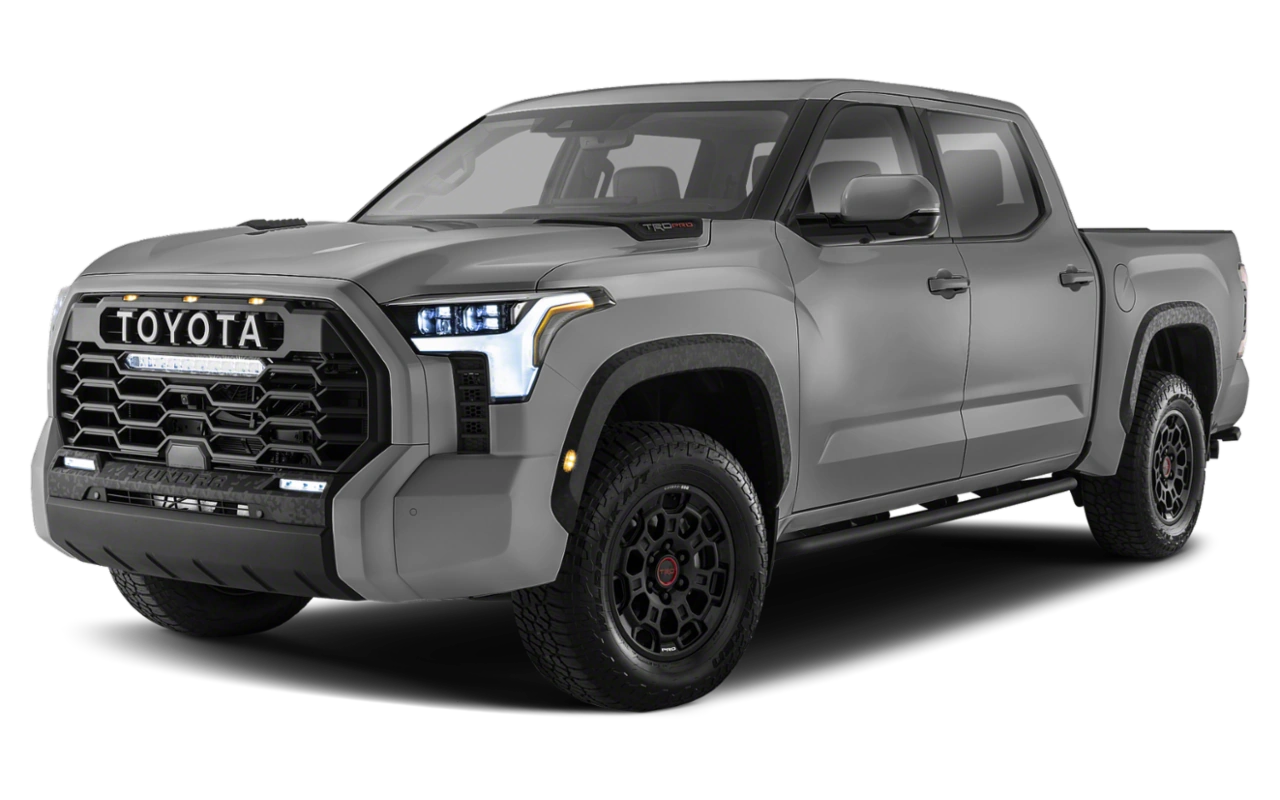
July 13, 2022 NHTSA CAMPAIGN NUMBER: 22V501000
Rearview Camera Malfunction/FMVSS 111
A rearview camera that fails to display the correct image can reduce the driver’s rear view, increasing the risk of a crash.
NHTSA Campaign Number: 22V501
Manufacturer Toyota Motor Engineering & Manufacturing
Components ELECTRICAL SYSTEM, BACK OVER PREVENTION
Potential Number of Units Affected 31,428
Summary
Toyota Motor Engineering & Manufacturing (Toyota) is recalling certain 2022 Tundra and Tundra Hybrid vehicles equipped with a Panoramic View Monitor (PVM) system. Incorrect programming of the parking-assist electronic control unit (ECU) software, may cause the front camera image to appear on the multimedia display instead of the rear camera image when the shifter is placed into reverse. As such, these vehicles fail to comply with the requirements of Federal Motor Vehicle Safety Standard number 111, “Rear Visibility.”
Remedy
Dealers will reprogram the parking assist ECU, free of charge. Owner notification letters were mailed July 27, 2022. Owners may contact Toyota customer service at 1-800-331-4331. Toyota’s number for this recall is 22TA07.
Notes
Owners may also contact the National Highway Traffic Safety Administration Vehicle Safety Hotline at 1-888-327-4236 (TTY 1-800-424-9153), or go to www.nhtsa.gov.
Check if your Vehicle has a Recall
Certain 2022 Model Year Tundra
Panoramic View Monitor System – Potential Failure to Display Rearview Image
| Model / Years | Production Period | Approximate Total Vehicles | Approximate Stop Sale Dealer Inventory |
| 2022 Tundra | 11/3/2021 – 7/12/2022 | 28,986 | 1100 |
| 2022 Tundra HV | 3/15/2022 – 7/08/2022 | 2,442 | 297 |
STOP! DO NOT SELL NEW VEHICLES IN DEALER INVENTORY.
Refer to Dealer Inventory Procedures section for more details.
On July 13th, 2022, Toyota filed a Non-compliance Information Report (NCIR) with the National Highway Traffic Safety Administration (NHTSA) informing the agency of our intent to conduct a voluntary Safety (Noncompliance) Recall on 2022 model year Tundra vehicles.
Condition
In the affected vehicles, a software programming issue can cause the front camera image of the Panoramic View Monitoring (PVM) system to display instead of the rear camera image when the vehicle is placed into reverse position. If the rear camera image does not display after the vehicle is placed into reverse position, the vehicle will not comply with certain U.S. safety requirements and may increase the risk of a crash during a backing event.
Remedy
Any authorized Toyota dealer will update the software in the Parking Assist ECU FREE OF CHARGE.
Note: All 2022 Model Year Tundras involved in Safety (Non-Compliance) Recall 22TA04, regardless if a repair has already been completed, have been moved to a separate Safety (Non-Compliance) Recall 22TA07. The remedy for 22TA07 also addresses and will repair the issue covered by 22TA04. 22TA04 is no longer active as of July 13th, 2022.
Covered Vehicles
There are approximately 32,428 vehicles covered by this Safety (Noncompliance) Recall. Approximately 443 vehicles involved in this Safety (Non-compliance) Recall were distributed to Puerto Rico.
Owner Letter Mailing Date
Toyota will notify owners by late July 2022.
Toyota makes significant effort to obtain current customer name and address information from each state through industry resources when mailing owner letters. In the event your dealership receives a notice for a vehicle that was sold prior to the Safety (Non-compliance) Recall announcement, it is the dealership’s responsibility to forward the owner letter to the customer who purchased the vehicle.
Please note that only owners of the covered vehicles will be notified. If you are contacted by an owner who has not yet received a notification, please verify eligibility by confirming through TIS prior to performing repairs. Dealers should perform the repair as outlined in the Technical Instructions found on TIS.
Inspection Reminder Mirror Hang Tags for Covered Vehicles in New Dealer Stock
To easily recognize vehicles involved in this Safety (Non-compliance) Recall, each dealership should utilize Inspection Reminder Hang Tags. Inside the vehicle’s glove box are stickers containing the VIN. Apply one of these stickers to the hang tag and install the hang tag in the vehicle. A sample copy of the Inspection Reminder Hang Tag has been included for your reference.
Pre-Owned Vehicles in Dealer Inventory
To ensure customer satisfaction, Toyota requests that dealers complete this Safety Recall on any used vehicles currently in dealer inventory that are covered by this Safety Recall prior to customer delivery. However, if the campaign cannot be completed (for example, due to remedy parts availability), delivery of a covered vehicle is acceptable if disclosed to the customer that the vehicle is involved in a Safety Recall.
Toyota expects dealers to use the attached Customer Contact and Vehicle Disclosure Form to obtain vehicle buyer information. Dealers are expected to provide a copy of the completed form, along with the most current FAQ, to the vehicle buyer. Toyota and the dealer may use this information to contact the customer when the remedy becomes available.
Keep the completed form on file at the dealership and send a copy to quality_compliance@toyota.com. In the subject line of the email state “Disclosure Form 22TA07” and include the VIN.
NOTE: Dealers can identify if any of their new and used inventory has any open campaigns in the Vehicle
Inventory Summary available in Dealer Daily (Non SET and GST dealers: https://dealerdaily.toyota.com/). The Vehicle Inventory Summary may take up to 4 hours to populate information for newly launched campaigns.
Toyota Certified Used Vehicle (TCUV)
The TCUV policy prohibits the certification of any vehicle with an outstanding Safety Recall, Special Service Campaign, or Limited Service Campaign. Thus, no affected units are to be designated, sold, or delivered as a TCUV until all applicable Safety Recalls, Special Service Campaigns, and Limited Service Campaigns have been completed on that vehicle.
Toyota Rent-A-Car (TRAC) & Service Loaners
Toyota requests that dealers remove all TRAC and Service Loaner vehicles from service that are covered by a Safety Recall unless the defect has been remedied.
Customer Contacts
Customers who receive the owner letter may contact your dealership with questions regarding the letter and/or the Safety (Non-compliance) Recall. Please welcome them to your dealership and answer any questions that they may have. A Q&A is provided to assure a consistent message is communicated.
If customers describe that they are experiencing the condition, advise them to manually toggle the rearview camera button on the multimedia display to view the rearview camera.
Customers with additional questions or concerns are asked to please contact the Toyota Brand Engagement Center (1-888-270-9371) – Monday through Friday, 8:00 am to 8:00 pm, Saturday 9:00 am to 7:00 pm Eastern Time.
Salvage Title Vehicles
Every attempt should be made to complete an open Safety Recall when circumstances permit, unless noted otherwise in the Safety Recall dealer letter.
For complete details on this policy, refer to Toyota Warranty Policy 4.17, “What Is Not Covered by The Toyota New Vehicle Limited Warranty”.
Media Contacts
It is imperative that all media contacts (local and national) receive a consistent message. In this regard, all media contacts must be directed to Tyler Litchenberger (469) 292-2671 in Toyota Corporate Communications. Please do not provide this number to customers. Please provide this contact only to media.
Remedy Procedures
Refer to TIS for Technical Instructions on repair. Conduct all non-completed Safety Recalls and Service Campaigns on the vehicle during the time of appointment.
Customer Reimbursement
Reimbursement consideration instructions will be included in the owner letter.
SAFETY (NON-COMPLIANCE) RECALL 22TA07 (Remedy Notice)
Certain 2022 Model Year Tundra
Panoramic View Monitor System – Potential Failure to Display Rearview Image
Frequently Asked Questions
Original Publication Date: July 13, 2022
Q1: What is the condition?
In the affected vehicles, a software programming issue can cause the front camera image of the Panoramic View Monitoring (PVM) system to display instead of the rear camera image when the vehicle is placed into reverse position. If the rear camera image does not display after the vehicle is placed into reverse position, the vehicle will not comply with certain U.S. safety requirements and may increase the risk of a crash during a backing event.
Q1a: Are there any symptoms or warnings that the condition is present?
Owners may notice the image displayed on the main multimedia screen after shifting into reverse is actually an image from the front camera instead of the rear camera.
Q1b: What should I do if I experience the condition?
If the condition is present, you may notice the image displayed on the main multimedia screen, after shifting into reverse, is actually an image from the front camera instead of the rear camera. If you experience this condition, , there are several different steps you can take to try to allow the camera system to reset and display the rearview image. First try to select the rearview camera function manually on the main multimedia screen. If the rear camera still does not display, you may also try shifting the vehicle to park, and then back to reverse. You may also try to shift the vehicle to park, turn the vehicle ignition off and back on again which may allow the camera system to work properly.
Q2: What is Toyota going to do?
Toyota will send an owner notification by first class mail by late July 2022, advising owners to make an appointment with their authorized Toyota dealer to have the Parking Assist ECU software updated FREE OF CHARGE.
Q3: I previously received a letter, from Toyota regarding a software update for my vehicle, Safety Recall 22TA04. Do I still need to get this update completed?
Yes. Safety Recall 22TA04 involves a different condition than this Safety Recall. Even if you had the update for 22TA04 completed by your dealer, you also need to have this update completed. . If the software update for 22TA04 has not previously been completed, this update will remedy both conditions.
Q4: Which and how many vehicles are covered by this Safety (Non-compliance) Recall?
There are approximately 31,428 vehicles covered by this Safety (Non-compliance) Recall.
| Model Name | Model Year | Production Period |
| Tundra | 2022 | 11/3/2021 – 7/1/2022 |
| Tundra HV | 2022 | 3/15/2022 – 6/30/2022 |
Q4a: Are there any other Lexus/Toyota/Scion vehicles covered by this Safety (Non-compliance) Recall in the U.S.?
No, there are no other Lexus/Toyota/Scion vehicles covered by this Safety (Non-compliance) Recall. This condition is specific to certain 2022 Model Year Tundra vehicles with Parking Assist.
Q5: How long will the repair take?
The repair takes approximately 45 minutes. However, depending upon the dealer’s work schedule, it may be necessary to make the vehicle available for a longer period of time.
Q6: What if I previously paid for repairs related to this Safety (Non-compliance) Recall?
Reimbursement consideration instructions will be provided in the owner letter.
Q7: How does Toyota obtain my mailing information?
Toyota uses an industry provider who works with each state’s Department of Motor Vehicles (DMV) to receive registration or title information, based upon the DMV records. Please make sure your registration or title information is correct.
Q8: What if I have additional questions or concerns?
If you have additional questions or concerns, please contact the Toyota Brand Engagement Center at 1-888-270-9371 Monday through Friday, 8:00 am to 8:00 pm, Saturday 9:00 am to 7:00 pm Eastern Time.
Identification of Involved Vehicles and Affected Components:
Based on production records, we have determined the involved vehicle population to be the vehicles listed in the table below.
| Make/Car Line | Model Year | Manufacturer | Production Period |
| Toyota / Tundra | 2022 | TMMTX | November 3, 2021, through July 12, 2022 |
| Toyota / Tundra HV | 2022 | TMMTX | March 15, 2022, through July 8, 2022 |
| Applicability | Part Number | Part Name | Component Description |
| Toyota / Tundra | 86792-0C051
86792-0C052 | COMPUTER, PARKING ASSIST | Parking Assist ECU |
| Toyota / Tundra HV |
Note:
(1) Although the involved vehicles are within the above production period range, not all vehicles in this range were sold in the U.S.
(2) The Parking Assist ECU is a component of the Panoramic View Monitor (PVM) system described below.
(3) Only vehicles in the above production range which were equipped with the PVM system of a specific design and supplier are involved in this recall. Other Toyota vehicles, including 2022 model year Tundra vehicles with the base integrated backup camera, are not equipped with this system.
Total Number of Vehicles Involved:
Tundra: 28,986
Tundra HV: 2,442
Total: 31,428
Percentage of Vehicles Estimated to Actually Experience Noncompliance:
100% of the involved vehicles contain a Parking Assist ECU with the incorrect software programming described in Section 5 below. Whether the issue will cause the rearview image to not be displayed to the driver during each backing event depends on whether the vehicle had used the front sonar sensors to detect an object and the front camera image was displayed on the invehicle display prior to the vehicle being placed into reverse position, and will influence whether the rear camera signal activation criteria is ignored at each new backing event, as described in Section 5 below
Description of Noncompliance:
The subject vehicles are equipped with a Panoramic View Monitor (PVM) system, which consists of multiple individual cameras located around the vehicle, including a front view and rearview camera, and a parking assist ECU. The PVM system uses the parking assist ECU to activate the signals for each of these cameras, as needed, in order to display the corresponding image. One of the front camera signal activation criteria is based on sonar sensor inputs, and the rearview camera signal activation criteria is based on shifting the vehicle into reverse position. Due to incorrect programming of the parking assist ECU software, if the vehicle had previously used the front sonar sensors to detect an object and the front camera image was displayed, when the vehicle is next placed into reverse position, there may be sporadic instances where the rear camera signal activation criteria is ignored, and the front camera image appears on the multimedia display instead of the rear camera image. As a result, the subject vehicles will not meet the rear visibility requirements in FMVSS No. 111, paragraph S6.2(b) which may increase the risk of a crash during a backing event.
Test Results and Other Information:
In early May 2022, during a pre-production test for a different Toyota model, the PVM system supplier identified an occurrence of the front view camera image being displayed when the vehicle was in reverse position, but after the front camera had used the front sonar sensors to detect an object. Separately, Toyota then observed the issue on a Tundra vehicle by initiating front sonar sensor object detection and front view camera display while in drive, then shifting the vehicle to park and cycling the ignition to “off”. Upon restarting the vehicle, after shifting into reverse, the front view camera image was displayed on the multimedia display instead of the rearview image. A design review was initiated in mid-May 2022. Through this process, the PVM system supplier found that the Parking Assist ECU software could allow queued “event flags”, which are inputs to activate the various PVM camera signals, to be cleared prematurely. If one of the Parking Assist ECU queued event flags was reverse position, the Parking Assist ECU could clear the event flag, leading it to ignore the request to display the rearview camera image.
As a result, Toyota determined on July 6, 2022, it is possible that the involved vehicles could experience a condition in which a rearview image does not display to the driver during a backing event and as such, does not meet the requirements of FMVSS No. 111 S6.2(b).
Description of Corrective Repair Action:
All known owners of the involved vehicles will be notified via first class mail to return their vehicles to a Toyota dealer. For all involved vehicles, the dealers will reprogram the Parking Assist ECU at no cost.
Reimbursement Plan for pre-notification remedies
As the owner notification letters will be mailed out well within the active period of the Toyota New Vehicle Limited Warranty (“Warranty”), all involved vehicle owners for this recall would have been provided a repair at no cost under Toyota’s Warranty.
Recall Schedule:
Notifications to owners of the affected vehicles will occur by August 17, 2022. A copy of the draft owner notification letter(s) will be submitted as soon as available.
Distributor/Dealer Notification Schedule:
Notifications to distributors/dealers will be sent by July 13, 2022. Copies of dealer communications will be submitted as they are issued.
Manufacturer’s Campaign Number:
Campaign Number: 22TA07
Panoramic View Monitor System – Potential Failure to Display Rearview Image – 2022 Toyota Tundra & Tundra Hybrid
Panoramic View Monitor System – Potential Failure to Display Rearview Image – 2022 Toyota Tundra & Tundra Hybrid
2 Affected Products
Vehicles
7 Associated Documents
Recall Acknowledgement
RCAK-22V501-2874.pdf 645.883KB
Noncompliance Notice 573 Report
RCLRPT-22V501-1591.PDF 216.145KB
Remedy Instructions and TSB
RCRIT-22V501-6037.pdf 658.447KB
Toyota – Noncompliance Information Report – July 2022
RMISC-22V501-2233.pdf 126.892KB
Toyota – Dealer Letter – July 2022
RCMN-22V501-5061.pdf 792.039KB
ISSUED Owner Notification Letter(Part 577)
Remedy Instructions and TSB
RCRIT-22V501-8693.pdf 648.54KB
Latest Recalls Documents
Reprogramming
Approved J2534 Devices only provide reprogramming capabilities and do not support diagnostic scantool functions. For full diagnostic capabilities, please consider TIS Techstream or Techstream Lite
Toyota, Scion, and Lexus ECMs can be reprogrammed with the TIS Techstream, Techstream Lite, Diagnostic Tester, or can also be reprogrammed using a Toyota validated J2534 interface. Vehicle recalibration requires the use of the following:
- TIS Professional Level Subscription
- Toyota Calibration Update Wizard software (installed along with Techstream Software)
- Personal Computer running Microsoft Windows XP/2000 or later operating system
Toyota strongly recommends USING ONLY VALIDATED INTERFACE DEVICES that appear on this list.
Toyota works closely with J2534 interface manufacturers to ensure that their hardware works safely and efficiently with our products. Every device listed on this page has been thoroughly tested and validated on Toyota, Scion, and Lexus vehicles.
It is important to understand that only the specific devices, firmware, DLLs and APIs listed here have been tested by Toyota. We do not recommend use of any other J2534 device, firmware, DLL or API that is not listed here. Changes to J2534 hardware/software is outside of Toyota's control; in some cases, changes made to device hardware/software can negatively impact reprogramming performance. Toyota makes every effort to continue to work with J2534 interface manufacturers to ensure continued product compatibility as our respective products evolve.
J2534 Approved Device Application Chart
| Device Name |
Supplier | Version | CUW Version |
Supported OS | ||
|---|---|---|---|---|---|---|
| Firmware* | DLL* | API* | ||||
| Flasher LT-Import | Bosch Diagnostics | 01.02.07 | 01.02.07 | 04.04 | 8.8 | B, C, D, E |
| Flasher PRO | Bosch Diagnostics | 01.09.18 | 01.09.18 | 04.04 | 8.8 | B, C, D, E |
| Mastertech VCI | Bosch Diagnostics | 13.0.75.27 | 2.0.75.27 | 04.04 | Testing in Progress | B, C, D, E |
|
VSI-2534 |
Dearborn Group | 1.112 | 2.05.22 | 04.04 | 8.10 | C, D |
| Drew Technologies | 01.09.18 | 01.09.18 | 04.04 | 8.8 | B, C, D, E | |
| Mongoose MFC | Drew Technologies | 01.02.07 | 01.02.07 | 04.04 | 8.8 | B, C, D, E |
| Drew Technologies | 1.1.12.0 | 1.1.12.0 | 04.04 | 8.16 | A, B, C, D | |
| Pass Thru Pro II | Snap-On | 01.09.18 | 01.09.18 | 04.04 | 8.8 | B, C, D, E |
*Original validated firmware/DLL versions may be superceded by the device manufacturer. Contact the device manufacturer if you are unable to find the versions listed above.
Supported Operating Systems
| A | Windows 8 (32-bit; 64-bit) |
| B | Windows 7 (32-bit; 64-bit) |
| C | Windows VISTA Home Basic, Home Premium, Business, Ultimate |
| D | Windows XP Pro SP1 or later |
| E | Windows 2000 SP2 or later |
For more information about the J2534 devices listed above, click on the vendor names. To report compatibility problems with listed hardware/software, please contact the device manufacturer.
Obtaining Calibration Files
The Flash Reprogramming Calibration CD is no longer available.
ECU Calibrations are now available for download directly from TIS. A valid TIS Professional Level subscription is required to access Calibration files. These files are compatible with the above mentioned scantools and J2534 interfaces. The Calibration page, located on the Diagnostics tab in the TIS site, contains all the most current vehicle calibration files, applicable Service Bulletins, and instructions for use. Select the following link for step by step instructions to access this page.
Note: Calibration Update Software is now included in the Techstream Software Installer. A valid TIS Professional Level subscription is required to download and install Techstream Software.

- J2534 Pass-Thru Programmer: TOPDON RLink J2534 is an advanced diagnostic and reprogramming tool that support all J2534 protocols, as well as D-PDU, CAN-FD and DoIP, ensuring compatibility with a wide range of modern vehicles. It offers extensive versatility with support for over 18 major automotive brands, including Chrysler, Ford, GM, Nissan, Toyota, Honda, Subaru, Land Rover/Jaguar, Volvo, Wuling, Volkswagen/Audi, Mercedes-Benz, and BMW. NOTE: Not compatible with Ford IDS diagnostic software
- All-in-One OEM Diagnostics: This J2534 ECU programming tool elevates your automotive repair capabilities to new heights by delivering complete OEM diagnosis. Boasting comprehensive full-system diagnostics, intuitive repair guides, advanced ECU programming and coding, common reset services, a vast library of repair information and more, this all-in-one solution empowers technicians to effortlessly tackle complex vehicle issues with ease. *Not compatible with 24V vehicles
- Proven Performance You Can Trust: Backed by over 10000 real vehicle tests and benefit from a wealth of practical experience, this OEM reprogramming tool guarantees stable and exceptional performance. Supported by TOPDON's dedicated technical experts with in-depth knowledge of both auto repair and J2534 Pass-Thru programming, the RLink J2534 provides prompt and professional assistance, ensuring a smooth setup and reliable compatibility
- Integrated Excellence, Always Up-to-Date: Featuring the exclusive RLink Platform to provide a streamlined experience with one-click driver installation and management, ensuring flawless integration with your OE software, maintaining the original performance quality. The built-in operation guide makes mastering OE software quick and easy, so you can get started right away. Plus, with lifetime free updates, your diagnostics will stay current with the latest drivers and innovations
- Efficiency Meets Versatility: Engineered to support three CAN channels simultaneously - CAN FD and CAN-CC included, giving you the edge in fast troubleshooting. To perfectly synchronized with the OE software, please diagnose with active subscriptions and make sure your computer system is running a compatible 64-bit Windows version (7, 8, 10 or later) to fully leverage the power of RLink J2534. *We don't provide extra OE software

- Advanced VCI Box, Industry-leading J2534 Pass-Thru Technology: This J2534 Pass-Thru Programmer is designed espically for technicians, independent shop owners, and DIY enthusiasts, enables fast, reliable computer-based programming. It supports all J2534 protocols—including the latest DoIP and CAN FD—ensuring full compatibility with both legacy and next-generation vehicles.
- High-Speed OEM-Level Diagnostics & Programming: Unlock true OEM functionality with comprehensive system diagnostics, guided troubleshooting, coding, adaptations, resets, and programming—all designed to slash repair time. This all-in-one tool eliminates the need for multiple OEM devices, boosting efficiency and cutting costs. Equipped with High-Speed USB, it delivers 10x more data per second than competing solutions
- Coverage for 17 Car Brands & Ultra Reliability: Works seamlessly for Chrysler, for Ford(Forscan), for GM, for Nissan, for Toyota, for Honda, for Subaru(SSM4), for Land Rover/Jaguar, for Volvo, for Wuling, for Volkswagen, for Mercedes-Benz, and for BMW. Backed by over 10000 real vehicle tests and benefit from a wealth of practical experience, this OEM reprogramming tool guarantees stable and exceptional performance
- User-Friendly RLink Platform & Expert Support: TOPDON’s proprietary driver management platform offers a clean interface and lifetime free updates. Access a rich library of real-world case studies to stay ahead of the curve. Backed by a support team with 10+ years of J2534 and automotive repair experience, we provide one-on-one assistance to resolve any technical issue.
- 6.6 ft USB-C Cable & Portable Storage Case: The RLink J2534 diagnostic tool features a 6.6ft USB 2.0 Cable and a 1.2 ft OBDII Extension Cable, allows to connection your computer easily outside the vehicle. The included handled carry case offers easy portability, storage, and hanging options—keeping your gear clean and ready to go, anywhere.

- Dual WiFi & 10.1" Touchscreen: Provides a stable, high-speed wireless link 3x faster than bluetooth, and a responsive, professional interface. Topdon ONE obd2 scanner diagnostic tool ensures smooth, non-lagging diagnostic scan, boosting mechanic efficiency
- J2534 Pass-Thru Support: The included ONE VCI supports the J2534 standard, allowing it to function as a pass-thru device when paired with OEM diagnostic software.Through TOPDON’s RLink platform, technicians can perform dealer-level coding, expanding in-house capabilities without investing in multiple factory automotive scan tools
- OE Topology Mapping: Visualize the vehicle’s ECU network exactly as it’s built.Zoom, pan, and highlight specific modules to pinpoint component issues with precision.Topology mapping displays real-time communication between modules
- 50+ Service Functions: Covers high-demand services like ADAS calibration, DPF regen, TPMS reset, ABS bleed, and throttle adaptation.Expands your service menu, allows you to charge premium rates, and turns away zero jobs due to lack of tooling. Vehicle-specific functionality may vary
- Advaned ECU Coding: 10 of the most serviced brands in North America, including full ECU coding and flash hidden support for BMW, VW, Au-di, Benz, Porsche, Toyota, Ni ssan and more. Enables module replacement, feature customization, and personal settings with automatic backup or restore.Lets your shop safely offer high-margin customization services, attracting more customers and boosting profit

- [J2534 Pass-Thru Programmer] - TOPDON RLink J2534 is engineered for professional technicians, delivering OEM diagnostic and reprogramming capabilities. It supports all J2534 protocols, CAN-FD, DoIP, D-PDU. Compatible with 17 vehicle brands—such as Chrysler, Ford, GM, KIA, Hyundai, Nissan, Toyota, Honda, Subaru, Mitsubishi, MAZDA, Land Rover/Jaguar, Volvo, Volkswagen/Audi, Mercedes-Benz, and BMW. RLink J2534 can help reduce the cost of purchasing equipment from different brands.
- [All-in-One OEM Reprogramming and Diagnostics] - When seamlessly integrated with OEM diagnostic software, this dongle enables you to perform a wide range of functions, including ECU programming and coding, DTC reading and clearing, active tests, component matching, adaptations, rewriting, guided troubleshooting, and more. This all-in-one tool eliminates the need for multiple OEM devices, significantly boosting work efficiency.
- [Tested, Trusted, and Proven for Accuracy] - TOPDON RLink J2534 is renowned for its reliability, having successfully completed over 10,000 real-vehicle tests. The wealth of data and hands-on experience behind it ensures consistent performance and accurate results. You can trust this tool to deliver optimal performance.
- [One-Click Installation, Continuous Updates] - The exclusive TOPDON RLink platform streamlines installation with a one-click driver setup, allowing you to quickly access OEM software for diagnostic and reprogramming tasks. With lifetime free updates, your RLink J2534 stays current without any additional cost, ensuring reliable performance for the long term. *We don't provide extra OE software.
- [Works with Windows Compatibility and OEM Software Subscription] - The RLink J2534 supports three CAN channels - including CAN FD and CAN-CC, providing advantages in the process of rapid troubleshooting. Compatible with Windows 7, 8 and 10 (64-bit) and higher versions of the system. For full functionality, an active OEM software subscription is required for each supported vehicle brand. Please note that the dongle does not include OEM software, which must be purchased separately to access brand-specific diagnostic and reprogramming features.
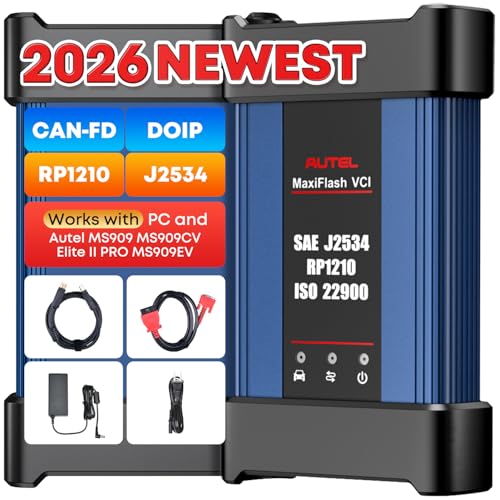
- 💯【Conta.ct us for Support Directly】For any issues experienced after purchase, please reach out to: 📞autelsupply@ outlook. com🛣️. Our team will provide perfect solution for you. For tech support or [explore additional accessory], please cont.act our team: 📞autelsupply@ outlook. com🛣️.
- 🌎【Autel J2534 Pass-Thru Progra.mmer】As an OEM Pass-Thru Progra.mmer Vehicle interface for multiple makes, Autel MaxiFlash J2534 support all J2534 protocols, D-PDU, CAN-FD and DoIP protocols. 2026 newer Autel MaxiFlash J2534 VCI can works with P-C and download OEM vehicle software, seamlessly conduct OE-level diagnostic-progra.mming-c0ding. Also, Work with Elite II Pro/ Ultra Lite/ MS909/ MS909CV/ MS909EV to directly pro.gram on Merce.des-Be.nz & BM.W. Autel J2534 Progr.ammer is a multi-functional device and supports 10+ major brands, including for Hond.a, G.M, LandRo.ver, BM.W, Chrysl.er, For.d, Hyun.dai, Ki.a, Merc.edes B.enz, Toyot.a, Volksw.agen etc.
- 🌎【Enhanced Protocol: J2534/D-PDU/RP1210/CAN FD/DoIP】Autel MaxiFlash JVCI is a blueto.oth communicate device, it supports latest CAN FD DoIP CAN protocols, compliant with automotive D-PDU/ J2534/ RP1210 standards. It can perform standard PassThru J2534 functions: compatible with Toyota Techstream, Volvo VIDA, Honda HDS, Jaguar Land Rover IDS and BM.W 3G for OEM diagnostics. CAN FD protocol is mainly for GM 2019+, DoIP protocol is mainly for Volvo 2018+, for L-and Rover/for Jaguar 2017+, for BM.W F chassis and G chassis.
- 🌎【Compatible with P-C/ WIND.OWS 】The Autel J2534 VCI can be connected to a compu.ter via a data cable; once the corresponding OEM software is installed, it enables do advanced progr.amming and c0ding on your vehicles. Easy Steps: 1) Connect to P-C via a USB cable 2) download OEM vehicle software 3) Start Diagnose. Take For.d for example, you can download OEM software on mot.orcraft.erservi.ce website, such as: For.d Diagnostic Software downloads, As B.uilt Data, Updated Cali.bration information, then use different software do relevant features.
- 🌎【Work with Autel Elite II Pro/ Ultra Lite/ MS909/ MS909CV/ MS909EV】This 2026 latest Autel J2534 Pass-Thru VCI is 100% compatible with Autel Elite II Pro Ultra Lite MS909 MS909CV MS909EV to perform advanced functions from diagnose to progra.mming.
- ALL OF THE J2534 PROTOCOLS - This single unit has all of the protocols you need for your OEM J2534 reprogramming and diagnostics including the latest in DoIP and CanFD
- J2534 TECHNICAL SUPPORT - FREE for the life of the tool. Staffed by technicians who understand vehicle repair and J2534 Pass‑thru
- TOOLBOX WITH OEM APPLICATION DESCRIPTIONS - educational video tutorials and real-time news – Giving you the confidence and up-to-date knowledge to get the job done
- J2534 v05.00 API - The newest version of J2534 to give you the latest in pass-thru technology
- FUTURE PROOF WITH 4 CAN CHANNELS - Going beyond the 3 required by select Chrysler/FCA models, CarDAQ-Plus 3 also provides a 4th to meet the needs of future OEM applications
SEOCONTENT-START
TOYOTA Toyota Motor North America Vehicle Safety & Compliance Liaison Office 6565 Headquarters Drive, Plano, TX 75024 •• PROTECTED 関係者外秘 July 13, 2022 NONCOMPLIANCE INFORMATION REPORT 1. Vehicle Manufacturer Name: Toyota Motor Manufacturing, Texas, [“TMMTX”] 1 Lone Star Pass, San Antonio, TX 78264 Affiliated U.S. Sales Company Toyota Motor North America [“TMNA”] 6565 Headquarters Drive, Plano, TX 75024 Manufacturer of the Parking Assist ECU Magna Electronics 2050 Auburn Road, Auburn Hills, MI 48326 USA Phone: +1-248-696-6400 2. Identification of Involved Vehicles and Affected Components: Based on production records, we have determined the involved vehicle population to be the vehicles listed in the table below. Make/Car Line Model Year Manufacturer Production Period Toyota / Tundra 2022 TMMTX November 3, 2021, through July 12, 2022 Toyota / Tundra HV 2022 TMMTX March 15, 2022, through July 8, 2022 •• PROTECTED 関係者外秘 Applicability Part Number Part Name Component Description Toyota / Tundra 86792-0C051 86792-0C052 COMPUTER, PARKING ASSIST Parking Assist ECU Toyota / Tundra HV Note: (1) Although the involved vehicles are within the above production period range, not all vehicles in this range were sold in the U.S. (2) The Parking Assist ECU is a component of the Panoramic View Monitor (PVM) system described below. (3) Only vehicles in the above production range which were equipped with the PVM system of a specific design and supplier are involved in this recall. Other Toyota vehicles, including 2022 model year Tundra vehicles with the base integrated backup camera, are not equipped with this system. 3. Total Number of Vehicles Involved: Tundra: 28,986 Tundra HV: 2,442 Total: 31,428 4. Percentage of Vehicles Estimated to Actually Experience Noncompliance: 100% of the involved vehicles contain a Parking Assist ECU with the incorrect software programming described in Section 5 below. Whether the issue will cause the rearview image to not be displayed to the driver during each backing event depends on whether the vehicle had used the front sonar sensors to detect an object and the front camera image was displayed on the in-vehicle display prior to the vehicle being placed into reverse position, and will influence whether the rear camera signal activation criteria is ignored at each new backing event, as described in Section 5 below 5. Description of Noncompliance: The subject vehicles are equipped with a Panoramic View Monitor (PVM) system, which consists of multiple individual cameras located around the vehicle, including a front view and rearview camera, and a parking assist ECU. The PVM system uses the parking assist ECU to activate the signals for each of these cameras, as needed, in order to display the corresponding image. One of the front camera signal activation criteria is based on sonar sensor inputs, and the rearview camera signal activation criteria is based on shifting the vehicle into reverse position. Due to incorrect programming of the parking assist ECU software, if the vehicle had previously used the front sonar sensors to detect an object and the front camera image was displayed, when the vehicle is next placed into reverse position, there may be sporadic instances where the rear camera signal activation criteria is ignored, and the front camera image appears on the multimedia display instead of the rear camera image. As a result, the subject vehicles will not meet the rear visibility requirements in FMVSS No. 111, paragraph S6.2(b) which may increase the risk of a crash during a backing event. •• PROTECTED 関係者外秘 6. Test Results and Other Information: In early May 2022, during a pre-production test for a different Toyota model, the PVM system supplier identified an occurrence of the front view camera image being displayed when the vehicle was in reverse position, but after the front camera had used the front sonar sensors to detect an object. Separately, Toyota then observed the issue on a Tundra vehicle by initiating front sonar sensor object detection and front view camera display while in drive, then shifting the vehicle to park and cycling the ignition to “off”. Upon restarting the vehicle, after shifting into reverse, the front view camera image was displayed on the multimedia display instead of the rearview image. A design review was initiated in mid-May 2022. Through this process, the PVM system supplier found that the Parking Assist ECU software could allow queued “event flags”, which are inputs to activate the various PVM camera signals, to be cleared prematurely. If one of the Parking Assist ECU queued event flags was reverse position, the Parking Assist ECU could clear the event flag, leading it to ignore the request to display the rearview camera image. As a result, Toyota determined on July 6, 2022, it is possible that the involved vehicles could experience a condition in which a rearview image does not display to the driver during a backing event and as such, does not meet the requirements of FMVSS No. 111 S6.2(b). 7. Description of Corrective Repair Action: All known owners of the involved vehicles will be notified via first class mail to return their vehicles to a Toyota dealer. For all involved vehicles, the dealers will reprogram the Parking Assist ECU at no cost. Reimbursement Plan for pre-notification remedies As the owner notification letters will be mailed out well within the active period of the Toyota New Vehicle Limited Warranty (“Warranty”), all involved vehicle owners for this recall would have been provided a repair at no cost under Toyota’s Warranty. 8. Recall Schedule: Notifications to owners of the affected vehicles will occur by August 17, 2022. A copy of the draft owner notification letter(s) will be submitted as soon as available. 9. Distributor/Dealer Notification Schedule: Notifications to distributors/dealers will be sent by July 13, 2022. Copies of dealer communications will be submitted as they are issued. 10. Manufacturer’s Campaign Number: Campaign Number: 22TA07
**************************************************************************************************************
Toyota Motor Sales, U.S.A., Inc. 6565 Headquarters Drive Plano,TX 75024 IMPORTANT SAFETY RECALL 22TA07 (Remedy Notice) Certain 2022 Model Year Tundra and Tundra Hybrid Vehicles Panoramic View Monitor System – Potential Failure to Display Rearview Image NHTSA Recall No. 22V-501 Dear <FirstName/LastName>: This notice is sent to you in accordance with the National Traffic and Motor Vehicle Safety Act. Toyota has decided that certain 2022 model year Tundra and Tundra Hybrid vehicles fail to conform to Federal Motor Vehicle Safety Standard (FMVSS) No.111, “Rear Visibility”. You received this notice because our records, which are based primarily on state registration and title data, indicate that you are the current owner. What is the condition? In the affected vehicles, a software programming issue can cause the front camera image of the Panoramic View Monitoring (PVM) system to display instead of the rear camera image when the vehicle is placed into reverse position. If the rear camera image does not display after the vehicle is placed into reverse position, the vehicle will not comply with certain U.S. safety requirements and may increase the risk of a crash during a backing event. 22TA07 URGENT SAFETY RECALL This is an important Safety Recall. The remedy will be performed FREE OF CHARGE to you. What Should You Do? Please contact any authorized Toyota dealer to schedule an appointment to have the remedy performed as soon as possible. Your local Toyota dealer will be more than happy to answer any of your questions. To find a dealer near you, visit www.toyota.com/dealers. For more information on this and other Safety Recalls, including Frequently Asked Questions, visit www.toyota.com/recall. Input your full 17-digit Vehicle Identification Number (VIN) noted above to review information specific to your vehicle. If you require further assistance, you may contact the Toyota Brand Engagement Center at 1-888-270-9371 Monday through Friday, 8:00 a.m. to 8:00 p.m., Saturday 9:00 a.m. to 7:00 p.m., Eastern Time. This notice applies to your vehicle: VIN ABCDEFGH987654321 Spanish translation on back side Traducción en español en el lado inverso What will Toyota do? Any authorized Toyota dealer will update the software in the Parking Assist ECU FREE OF CHARGE to you. NOTE: You may have previously received a notice from Toyota about a software update for your vehicle under Safety Recall 22TA04. Safety Recall 22TA04 involves a different condition than this Safety Recall. Even if you already had the update for 22TA04 completed by your dealer, you also need to have this update completed. If the software update for 22TA04 has not previously been completed, this update will remedy both conditions. This is an important Safety Recall. The remedy will take approximately 45 minutes. However, depending on the dealer’s work schedule, it may be necessary to make your vehicle available for a longer period of time. Note: If the condition is present, you may notice the image displayed on the main multimedia screen after shifting into reverse, is actually an image from the front camera instead of the rear camera. If you experience this condition, there are several different steps you can take to try to allow the camera system to reset and display the rearview image. First try to select the rearview camera function manually on the main multimedia screen. If the rear camera still does not display, you may also try shifting the vehicle to park, and then back to reverse. You may also try to shift the vehicle to park, turn the vehicle ignition off and back on again which may allow the camera system work properly. What if you have previously paid for repairs to your vehicle for this specific condition? If you have previously paid for repair(s) to your vehicle for this specific condition prior to receiving this letter, you may be eligible for reimbursement. For reimbursement consideration, please submit a copy of your repair details (for example: a repair order), proof-of-payment, and ownership information to Toyota’s online, self-service portal. Log-in to your Toyota Owners account at https:/www.toyota.com/owners/, click on the “Resources” tab, select “Safety Recalls and Service Campaigns,” and click on “Submit Reimbursement Request.” Alternatively, if you prefer to mail or fax this information for reimbursement consideration, please use the address or fax number shown below: Toyota Brand Engagement Center – TSR, Toyota Motor Sales, USA, Inc. c/o Toyota Motor North America, Inc., P O Box 259001 – SSC/CSP Reimbursements, Plano, Texas 75025-9001 FAX: 310-381-7756 Please refer to the attached Reimbursement Checklist for required documentation details. What if you are not the owner or operator of this vehicle? If you are a vehicle lessor, Federal Law requires that any vehicle lessor receiving this recall notice must forward a copy of this notice to the lessee within ten days. If you know the current owner or operator, please forward this letter to them. If you would like to update your vehicle ownership or contact information, please visit https://www.toyota.com/owners. If you believe that the dealer or Toyota has failed or is unable to remedy the defect within a reasonable time or without charge, you may submit a complaint to the Administrator, National Highway Traffic Safety Administration, 1200 New Jersey Avenue S.E., Washington, D.C. 20590, or call the toll free Vehicle Safety Hot Line at 1-888-327-4236 (TTY: 1-800-424-9153), or go to http://www.safercar.gov. We have sent this notice in the interest of your continued satisfaction with our products. We sincerely regret any inconvenience this condition may have caused you. Thank you for driving a Toyota. Sincerely, Toyota Motor Sales, USA Toyota Motor Sales, U.S.A., Inc. 6565 Headquarters Drive Plano,TX 75024 RETIRO DE SEGURIDAD IMPORTANTE 22TA07 (Aviso de Remedio) Ciertos Vehículos Tundra y Tundra Hybrid de Año Modelo 2022 Sistema de Monitoreo de la Vista Panorámica – Posible Falla para Mostrar la Imagen de la Cámara para ver Hacia Atrás Retiro de Seguridad NHTSA No. 22V-501 Estimado (nombre/apellido del cliente): Se le envía esta notificación de acuerdo con la Acta Nacional de Tráfico y Seguridad de Vehîculos Motorizados. Toyota ha decidido que ciertos vehículos Tundra y Tundra Hybrid de año modelo 2022 fallaron con el cumplimiento de las Normas Federales de Seguridad para Vehículos de Motor (FMVSS) No.111, “Rear Visibility” (Visibilidad trasera). Usted recibió esta notificación porque nuestros registros, que se basan principalmente en los datos del estado de registro y de título, indican que usted es el propietario actual. ¿Cuál es la condición? En los vehículos afectados, un problema de programación de software puede ocasionar que la imagen de la cámara delantera del sistema de Monitoreo de la Vista Panorámica (PVM, por sus siglas en Inglés) se muestre en vez de la imagen de la cámara trasera cuando el vehículo se coloca en la posición de reversa. Si la imagen de la cámara trasera no se muestra cuando el vehículo está colocado en la posición de reversa, el vehículo no cumplirá con ciertas regulaciones de seguridad de los Estados Unidos y puede aumentar el riesgo de un choque durante un evento en retroceso. 22TA07 English version on front side Versión en inglés en el frente RETIRO DE SEGURIDAD URGENTE Este es un Retiro de Seguridad importante. El remedio se realizará SIN CARGO para usted. Esta notificación aplica a su vehículo: VIN ABCDEFGH987654321 ¿Qué Debe Hacer? Por favor comuníquese con cualquier concesionario Toyota autorizado para programar una cita para que realicen el remedio tan pronto como sea posible. Su concesionario Toyota local responderá con gusto todas sus preguntas. Para encontrar un concesionario cerca de usted, visite www.toyota.com/dealers. Si desea más información sobre este y otros Retiros de Seguridad, incluyendo las Preguntas Frecuentes, visite www.toyota.com/recall. Ingrese el número de identificación de su vehículo de 17 dígitos (VIN) indicado arriba para revisar la información específica de su vehículo. Si requiere más asistencia, puede comunicarse con el Centro de Compromiso con la Marca Toyota llamando al 1-888-270-9371, de lunes a viernes, de 8:00 a.m. a 8:00 p.m. y los sábados de 9:00 a.m. a 7:00 p.m., Hora del Este. ¿Qué hará Toyota? Cualquier concesionario autorizado Toyota actualizará el software en la ECU de la Asistencia de Estacionamiento SIN CARGO a usted. NOTA: Usted previamente pudo haber recibido una notificación de Toyota sobre la actualización de software para su vehículo bajo el Retiro de Seguridad 22TA04. El Retiro de Seguridad 22TA04 involucra una condición diferente a este Retiro de Seguridad. Incluso si ya se completó la actualización para 22TA04 por su concesionario, usted también necesita completar está actualización. Si la actualización del programa para 22TA04 no se completó previamente, esta actualización remediará ambas condiciones. Este es un Retiro de Seguridad importante. El remedio tomará aproximadamente 45 minutos. Sin embargo, dependiendo de la programación de trabajo del concesionario, tal vez sea necesario tener disponible su vehículo por un plazo más largo de tiempo. Nota: Si la condición está presente, usted puede observar que la imagen mostrada en la pantalla principal multimedia después de cambiar a reversa es una imagen de la cámara delantera en vez de la cámara trasera. Si usted experimenta esta condición, hay varios pasos diferentes que puede tomar para permitir que el sistema de la cámara se reinicie y muestre la imagen para ver hacia atrás. Primero intente seleccionar manualmente la función de la cámara para ver hacia atrás en la pantalla principal multimedia. Si la cámara trasera todavía no se muestra, usted puede intentar cambiar el vehículo a “Park” y luego a reversa. Usted también puede intentar cambiar el vehículo a “Park”, apagar el encendido y luego encenderlo de nuevo lo cual puede permitir que el sistema de la cámara funcione adecuadamente. ¿Qué pasa si anteriormente pagó reparaciones a su vehículo por esta condición específica? Si anteriormente usted pagó una(s) reparación(es) a su vehículo por esta condición específica antes de recibir esta carta, usted puede ser elegible para el reembolso. Para que se considere su reembolso, envíe una copia de los detalles de su reparación (por ejemplo, una orden de reparación), comprobante de pago e información de propiedad al portal de autoservicio en línea de Toyota. Ingrese en su cuenta de propietarios de Toyota en https:/www.toyota.com/owners/, haga clic en la pestaña de “Resources” (Recursos), seleccione “Safety Recall and Service Campaigns” (Retiros de Seguridad y Campañas de Servicio) y haga clic en “Submit Reimbursement Request ” (Enviar solicitud de reembolso). Como alternativa, si prefiere enviar esta información por correo postal o por fax para que le consideren el reembolso, utilice el domicilio o número de fax que aparece a continuación: Toyota Brand Engagement Center – TSR, Toyota Motor Sales, USA, Inc. c/o Toyota Motor North America, Inc., P O Box 259001 – SSC/CSP Reimbursements, Plano, Texas 75025-9001 FAX: 310-381-7756 Remítase a la lista de verificación de reembolsos anexa para conocer los detalles de los documentos requeridos. ¿Qué pasa si usted no es el propietario o el operador de este vehículo? Si usted arrienda el vehículo, la ley federal requiere que todo arrendador de vehículo que reciba esta notificación del Retiro de Seguridad debe enviar una copia del aviso al arrendatario en menos de diez días. Si conoce al propietario u operador actual, sea tan amable de enviarle esta carta. Si quisiera actualizar la propiedad de su vehículo o la información de contacto, por favor visite https://www.toyota.com/owners. Si cree que el concesionario o Toyota no ha cumplido o no ha podido remediar el defecto en un plazo razonable o sin cargo, puede enviar una queja al Administrador, National Highway Traffic Safety Administration, 1200 New Jersey Avenue S.E., Washington, D.C. 20590, o llamar a la línea directa sin costo de los vehículos al 1-888-327-4236 (TTY: 1-800-424-9153), o visite http://www.safercar.gov. Hemos enviado esta notificación con el interés de que usted esté continuamente satisfecho con nuestros productos. Lamentamos sinceramente cualquier inconveniente que este problema le pudo haber ocasionado. Muchas gracias por conducir un Toyota. Atentamente, Toyota Motor Sales, USA
**************************************************************************************************************
Toyota Motor Sales, USA, Inc. 6565 Headquarters Drive Plano, TX 75024 (469)292-4000 Original Publication Date: July 13, 2022 To: All Toyota Dealer Principals, General Managers, Service Managers, and Parts Managers SAFETY (NON-COMPLIANCE) RECALL 22TA07 (Remedy Notice) Certain 2022 Model Year Tundra Panoramic View Monitor System – Potential Failure to Display Rearview Image Model / Years Production Period Approximate Total Vehicles Approximate Stop Sale Dealer Inventory 2022 Tundra 11/3/2021 – 7/12/2022 28,986 1100 2022 Tundra HV 3/15/2022 – 7/08/2022 2,442 297 STOP! DO NOT SELL NEW VEHICLES IN DEALER INVENTORY. Refer to Dealer Inventory Procedures section for more details. On July 13th, 2022, Toyota filed a Non-compliance Information Report (NCIR) with the National Highway Traffic Safety Administration (NHTSA) informing the agency of our intent to conduct a voluntary Safety (Non-compliance) Recall on 2022 model year Tundra vehicles. Condition In the affected vehicles, a software programming issue can cause the front camera image of the Panoramic View Monitoring (PVM) system to display instead of the rear camera image when the vehicle is placed into reverse position. If the rear camera image does not display after the vehicle is placed into reverse position, the vehicle will not comply with certain U.S. safety requirements and may increase the risk of a crash during a backing event. Remedy Any authorized Toyota dealer will update the software in the Parking Assist ECU FREE OF CHARGE. Note: All 2022 Model Year Tundras involved in Safety (Non-Compliance) Recall 22TA04, regardless if a repair has already been completed, have been moved to a separate Safety (Non-Compliance) Recall 22TA07. The remedy for 22TA07 also addresses and will repair the issue covered by 22TA04. 22TA04 is no longer active as of July 13th, 2022. Covered Vehicles There are approximately 32,428 vehicles covered by this Safety (Noncompliance) Recall. Approximately 443 vehicles involved in this Safety (Non-compliance) Recall were distributed to Puerto Rico. © 2020 Toyota Motor Sales, USA S a f e t y ( N o n – c o m p l i a n c e ) R e c a l l 2 2 T A 0 7 – P a g e | 2 © 2022 Toyota Motor Sales, USA Owner Letter Mailing Date Toyota will notify owners by late July 2022. Toyota makes significant effort to obtain current customer name and address information from each state through industry resources when mailing owner letters. In the event your dealership receives a notice for a vehicle that was sold prior to the Safety (Non-compliance) Recall announcement, it is the dealership’s responsibility to forward the owner letter to the customer who purchased the vehicle. Please note that only owners of the covered vehicles will be notified. If you are contacted by an owner who has not yet received a notification, please verify eligibility by confirming through TIS prior to performing repairs. Dealers should perform the repair as outlined in the Technical Instructions found on TIS. S a f e t y ( N o n – c o m p l i a n c e ) R e c a l l 2 2 T A 0 7 – P a g e | 3 © 2022 Toyota Motor Sales, USA Dealer Inventory Procedures New Vehicles in Dealership Inventory There are approximately 1397 vehicles in new dealer inventory as of July 11, 2022. Under Title 49, Section 30112 of the United States Code, a dealer cannot sell, offer for sale, or introduce or deliver for introduction in interstate commerce a new motor vehicle when it is aware that the vehicle does not comply with an applicable Federal Motor Vehicle Safety Standard or contains a defect related to motor vehicle safety. Further, 49 Code of Federal Regulations §577.13 requires us to provide the following advisory: It is a violation of Federal law for a dealer to deliver a new motor vehicle or any new or used item of motor vehicle equipment (including a tire) covered by this notification under a sale or lease until the defect or non-compliance is remedied. Toyota reimburses dealers for flooring costs associated with new vehicles held in dealership inventory until the recall remedy becomes available. Toyota provides these flooring reimbursements at 60-day intervals. Toyota reserves the right to withhold or charge-back any flooring reimbursement funds that may have been paid to the dealer if it determines that a new vehicle subject to a safety recall was sold without first being remedied. Vehicle Safety Recall completion should always be verified through TIS. We request your assistance to ensure involved vehicles are identified and not delivered prior to performing the remedy. NOTE: •New vehicles in dealer inventory subject to a Safety Recall must be remedied before delivery intocommerce under a sale or lease. Dealer-to-dealer trades as well as vehicle sales between dealers should not be made until a vehicle is remedied. •Dealers can identify if any of their new and used inventory has any open campaigns in the Vehicle InventorySummary available in Dealer Daily (Non-SET and GST dealers: https://dealerdaily.toyota.com/). TheVehicle Inventory Summary may take up to 4 hours to populate information for newly launched campaigns. Inspection Reminder Mirror Hang Tags for Covered Vehicles in New Dealer Stock To easily recognize vehicles involved in this Safety (Non-compliance) Recall, each dealership should utilize Inspection Reminder Hang Tags. Inside the vehicle’s glove box are stickers containing the VIN. Apply one of these stickers to the hang tag and install the hang tag in the vehicle. A sample copy of the Inspection Reminder Hang Tag has been included for your reference. S a f e t y ( N o n – c o m p l i a n c e ) R e c a l l 2 2 T A 0 7 – P a g e | 4 Pre-Owned Vehicles in Dealer Inventory To ensure customer satisfaction, Toyota requests that dealers complete this Safety Recall on any used vehicles currently in dealer inventory that are covered by this Safety Recall prior to customer delivery. However, if the campaign cannot be completed (for example, due to remedy parts availability), delivery of a covered vehicle is acceptable if disclosed to the customer that the vehicle is involved in a Safety Recall. Toyota expects dealers to use the attached Customer Contact and Vehicle Disclosure Form to obtain vehicle buyer information. Dealers are expected to provide a copy of the completed form, along with the most current FAQ, to the vehicle buyer. Toyota and the dealer may use this information to contact the customer when the remedy becomes available. Keep the completed form on file at the dealership and send a copy to [email protected]. In the subject line of the email state “Disclosure Form 22TA07” and include the VIN. NOTE: Dealers can identify if any of their new and used inventory has any open campaigns in the Vehicle Inventory Summary available in Dealer Daily (Non SET and GST dealers: https://dealerdaily.toyota.com/). The Vehicle Inventory Summary may take up to 4 hours to populate information for newly launched campaigns. Toyota Certified Used Vehicle (TCUV) The TCUV policy prohibits the certification of any vehicle with an outstanding Safety Recall, Special Service Campaign, or Limited Service Campaign. Thus, no affected units are to be designated, sold, or delivered as a TCUV until all applicable Safety Recalls, Special Service Campaigns, and Limited Service Campaigns have been completed on that vehicle. Toyota Rent-A-Car (TRAC) & Service Loaners Toyota requests that dealers remove all TRAC and Service Loaner vehicles from service that are covered by a Safety Recall unless the defect has been remedied. © 2022 Toyota Motor Sales, USA NOTE: Dealerships can order hang tags from the Material Distribution Center (MDC). Part Number Description Quantity 00411-140003 Inspection Mirror Hang Tag 25 Per Pack S a f e t y ( N o n – c o m p l i a n c e ) R e c a l l 2 2 T A 0 7 – P a g e | 5 © 2022 Toyota Motor Sales, USA Customer Handling, Parts Ordering, and Remedy Procedures Customer Contacts Customers who receive the owner letter may contact your dealership with questions regarding the letter and/or the Safety (Non-compliance) Recall. Please welcome them to your dealership and answer any questions that they may have. A Q&A is provided to assure a consistent message is communicated. If customers describe that they are experiencing the condition, advise them to manually toggle the rearview camera button on the multimedia display to view the rearview camera. Customers with additional questions or concerns are asked to please contact the Toyota Brand Engagement Center (1-888-270-9371) – Monday through Friday, 8:00 am to 8:00 pm, Saturday 9:00 am to 7:00 pm Eastern Time. Salvage Title Vehicles Every attempt should be made to complete an open Safety Recall when circumstances permit, unless noted otherwise in the Safety Recall dealer letter. For complete details on this policy, refer to Toyota Warranty Policy 4.17, “What Is Not Covered by The Toyota New Vehicle Limited Warranty”. Media Contacts It is imperative that all media contacts (local and national) receive a consistent message. In this regard, all media contacts must be directed to Tyler Litchenberger (469) 292-2671 in Toyota Corporate Communications. Please do not provide this number to customers. Please provide this contact only to media. Parts Ordering Process – Non SET and GST Parts Ordering Process It is possible that parts for this campaign are either required to be ordered in Campaign Part Order Request (CPOR) on Service Lane, or have been placed on Manual Allocation Control (MAC) due to potential limited part availability. Please check the CPOR/MAC report on Dealer Daily for the most up-to-date parts ordering information. Dealers can identify which parts ordering method to use by reviewing the parts information section of Dealer Daily and checking for a MAC code on the part numbers below. For MAC code C, order through CPOR. For MAC code D, refer to the MAC report for further instructions. All Safety Recall, Service Campaign (SSC/LSC) parts are eligible for the Monthly Parts Return Program. Please refer to PANT Bulletin 2011-087 for campaign parts that are currently returnable under the Monthly Parts Return Program and for additional details. Technician Training Requirements The repair quality of covered vehicles is extremely important to Toyota. All dealership technicians performing this repair are required to successfully complete the most current version of the E-Learning course “Safety Recall and Service Campaign Essentials”. To ensure that all vehicles have the repair performed correctly; technicians performing this recall repair are required to currently have completed all of the following courses: •T623 Electrical Circuit Diagnosis S a f e t y ( N o n – c o m p l i a n c e ) R e c a l l 2 2 T A 0 7 – P a g e | 6 © 2022 Toyota Motor Sales, USA Always check which technicians can perform the repair by logging on to https://www.uotdealerreports.com. It is the dealership’s responsibility to select technicians with the above certification level or greater to perform this repair. Carefully review your resources, the technician skill level, and ability before assigning technicians to this repair. It is important to consider technician days off and vacation schedules to ensure there are properly trained technicians available to perform this repair at all times. Remedy Procedures Refer to TIS for Technical Instructions on repair. Conduct all non-completed Safety Recalls and Service Campaigns on the vehicle during the time of appointment. Repair Quality Confirmation The repair quality of covered vehicles is extremely important to Toyota. To help ensure that all vehicles have the repair performed correctly, please designate at least one associate (someone other than the individual who performed the repair) to verify the repair quality of every vehicle prior to customer delivery. Parts Recovery Procedures All parts replaced as part of this Safety Recall must be turned over to the parts department until appropriate disposition is determined. The parts department must retain these parts until notification via the Parts Recovery System (PRS) is received indicating whether to ship or scrap the parts. These parts are utilized by various departments for defect analysis, quality control analysis, product evaluation, as well as other purposes. To help minimize dealer storage challenges, Toyota recommends that dealers: •File the campaign claim accurately and promptly. The time a dealer is required to hold parts is based onwhen the campaign claim is paid by Toyota. •Monitor the Warranty Parts Recovery Notifications and Part Scrap Report regularly. Refer to Warranty Policies 9.3 and 9.6 for additional details S a f e t y ( N o n – c o m p l i a n c e ) R e c a l l 2 2 T A 0 7 – P a g e | 7 Warranty Reimbursement Procedures Warranty Reimbursement Procedure Op Code Description Flat Rate Hours 22TA70 Reprogram Parking Assist ECU 0.7 •The flat rate times include 0.1 hours for administrative cost per unit for the dealership. •In the rare case that Parking Assist ECU contains the latest calibration ID (no software update needed),use opcode 22TA70. Claim Filing Accuracy and Correction Requests It is the dealer’s responsibility to file claims correctly for this Safety (Noncompliance) Recall. This claim filing information is used by Toyota for various government reporting activities; therefore, claim filing accuracy is crucial. If it has been identified that a claim has been filed using an incorrect Op Code or a claim has been filed for an incorrect VIN, refer to Warranty Procedure Bulletin PRO17-03 to correct the claim. © 2022 Toyota Motor Sales, USA No Covered Yes Perform Health Check. Is a Update available for the Parking Assist ECU? Update the Parking Assist ECU CID. Not Covered Verify Vehicle Eligibility 1.Confirm vehicle VIN matches the RO. 2.Check Vehicle Inquiry System forCampaign eligibility. No further action required. Campaign completed, return the vehicle to the customer. Perform Verification Heath Check S a f e t y ( N o n – c o m p l i a n c e ) R e c a l l 2 2 T A 0 7 – P a g e | 8 © 2022 Toyota Motor Sales, USA Customer Reimbursement Reimbursement consideration instructions will be included in the owner letter. Campaign Designation / Phase Decoder 2219 = 201920 = 202021 = 202122 = 202223 = 2023Etc…Year Campaignis Launched22TA07TT = ToyotaL = LexusVehicle MakeAA = Safety Recall RemedyB = Safety Recall InterimC = Special Service CampaignD = Limited Service CampaignE = Customer Support ProgramF = Emissions Recall(May use other characters in unique cases)Field Action Category and Phase0701 = 1st Field Action of the year02 = 2nd Field Action of the year03 = 3rd Field Action of the year(The sequence is unique for each Field Action category)(May use other characters in unique cases)Field Action Sequence Examples: 19TA01 = Launched in 2019, Toyota, Safety Recall Remedy Phase, 1st Safety Recall Launched in 2019 20TC02 = Launched in 2020, Special Service Campaign, 2nd Special Service Campaign Launched in 2020 21TE05 = Launched in 2021, Customer Support Program, 5th Customer Support Program Launched in 2021 Please review this entire package with your Service and Parts staff to familiarize them with the proper step-by-step procedures required to implement this Safety (Non-compliance) Recall. Thank you for your cooperation. TOYOTA MOTOR SALES, U.S.A., INC. FAQ Page 1 of 2 © 2022 Toyota Motor Sales, USA SAFETY (NON-COMPLIANCE) RECALL 22TA07 (Remedy Notice) Certain 2022 Model Year Tundra Panoramic View Monitor System – Potential Failure to Display Rearview Image Frequently Asked Questions Original Publication Date: July 13, 2022 Q1: What is the condition? In the affected vehicles, a software programming issue can cause the front camera image of the Panoramic View Monitoring (PVM) system to display instead of the rear camera image when the vehicle is placed into reverse position. If the rear camera image does not display after the vehicle is placed into reverse position, the vehicle will not comply with certain U.S. safety requirements and may increase the risk of a crash during a backing event. Q1a: Are there any symptoms or warnings that the condition is present? A1a: Owners may notice the image displayed on the main multimedia screen after shifting into reverse is actually an image from the front camera instead of the rear camera. Q1b: What should I do if I experience the condition? A1b If the condition is present, you may notice the image displayed on the main multimedia screen, after shifting into reverse, is actually an image from the front camera instead of the rear camera. If you experience this condition, , there are several different steps you can take to try to allow the camera system to reset and display the rearview image. First try to select the rearview camera function manually on the main multimedia screen. If the rear camera still does not display, you may also try shifting the vehicle to park, and then back to reverse. You may also try to shift the vehicle to park, turn the vehicle ignition off and back on again which may allow the camera system to work properly. Q2: What is Toyota going to do? A1: Toyota will send an owner notification by first class mail by late July 2022, advising owners to make an appointment with their authorized Toyota dealer to have the Parking Assist ECU software updated FREE OF CHARGE. FAQ Page 2 of 2 © 2022 Toyota Motor Sales, USA Q3: I previously received a letter, from Toyota regarding a software update for my vehicle, Safety Recall 22TA04. Do I still need to get this update completed? A3: Yes. Safety Recall 22TA04 involves a different condition than this Safety Recall. Even if you had the update for 22TA04 completed by your dealer, you also need to have this update completed. . If the software update for 22TA04 has not previously been completed, this update will remedy both conditions. Q4: Which and how many vehicles are covered by this Safety (Non-compliance) Recall? A4: There are approximately 31,428 vehicles covered by this Safety (Non-compliance) Recall. Model Name Model Year Production Period Tundra 2022 11/3/2021 – 7/1/2022 Tundra HV 2022 3/15/2022 – 6/30/2022 Q4a: Are there any other Lexus/Toyota/Scion vehicles covered by this Safety (Non-compliance) Recall in the U.S.? A4a: No, there are no other Lexus/Toyota/Scion vehicles covered by this Safety (Non-compliance) Recall. This condition is specific to certain 2022 Model Year Tundra vehicles with Parking Assist. Q5: How long will the repair take? A5: The repair takes approximately 45 minutes. However, depending upon the dealer’s work schedule, it may be necessary to make the vehicle available for a longer period of time. Q6: What if I previously paid for repairs related to this Safety (Non-compliance) Recall? A6: Reimbursement consideration instructions will be provided in the owner letter. Q7: How does Toyota obtain my mailing information? A7: Toyota uses an industry provider who works with each state’s Department of Motor Vehicles (DMV) to receive registration or title information, based upon the DMV records. Please make sure your registration or title information is correct. Q8: What if I have additional questions or concerns? A8: If you have additional questions or concerns, please contact the Toyota Brand Engagement Center at 1-888-270-9371 Monday through Friday, 8:00 am to 8:00 pm, Saturday 9:00 am to 7:00 pm EasternTime. © 2022 Toyota Motor Sales, USA – Version 3a TOYOTA Toyota Motor Sales, USA, Inc. 6565 Headquarters Drive Plano, TX 75024 (469)292-4000 CUSTOMER CONTACT & VEHICLE DISCLOSURE FORM This form is not applicable for new vehicles in dealership inventory and TCUV units. This vehicle is involved in a Safety Recall. At this time, remedy parts are not available and the remedy has NOT been performed. I understand that the vehicle will need to be returned to an authorized Toyota dealer to have the remedy performed at NO CHARGE when the remedy is available. Customer Signature Toyota recommends that you register with the Toyota Owners Community at http://www.toyota.com/owners/ and regularly check recall applicability using www.toyota.com/recall or www.safercar.gov. You will need to input your 17-digit Vehicle Identification Number (VIN). Model Model Year Customer Information Customer Name Customer Email Customer Address Home Phone # Mobile Phone # Date Please provide this information so that Toyota or your dealer can notify you when the remedy becomes available. This information will only be used for campaign communications. If you’d like to update your preferred contact information in the future, visit www.toyota.com/ownersupdate or contact us at 1-888-270-9371. Dealer Information Dealer Name/Address Dealer Code Dealer Phone Number Dealer Staff Name Dealer Staff Signature VIN Campaign Code 4862-1610-2696 v.1 000409/09034, 8:14 PM, 07/11/2022 TOYOTA This notice applies to your vehicle: [VIN] URGENT SAFETY RECALL This is an important Safety Recall. The remedy will be performed FREE OF CHARGE to you. IMPORTANT SAFETY RECALL 22TA07 (Remedy Notice) Certain 2022 Model Year Tundra Vehicles Panoramic View Monitor System – Potential Failure to Display Rearview Image NHTSA Recall No. 22V–___ Dear (customer’s First/Last name) This notice is sent to you in accordance with the National Traffic and Motor Vehicle Safety Act. Toyota has decided that certain 2022 model year Tundra vehicles fail to conform to Federal Motor Vehicle Safety Standard (FMVSS) No.111, “Rear Visibility”. You received this notice because our records, which are based primarily on state registration and title data, indicate that you are the current owner. What is the condition? In the affected vehicles, a software programming issue can cause the front camera image of the Panoramic View Monitoring (PVM) system to display instead of the rear camera image when the vehicle is placed into reverse position. If the rear camera image does not display after the vehicle is placed into reverse position, the vehicle will not comply with certain U.S. safety requirements and may increase the risk of a back over crash. What should you do? Please contact any authorized Toyota dealer to schedule an appointment to have the remedy performed as soon as possible. Your local Toyota dealer will be more than happy to answer any of your questions. To find a dealer near you, visitwww.toyota.com/dealers. For more information on this and other SafetyRecalls, including Frequently AskedQuestions, visit www.toyota.com/recall. Inputyour full 17-digit Vehicle Identification Number(VIN) noted above to review informationspecific to your vehicle. If you require further assistance, you maycontact the Toyota Brand Engagement Centerat 1-888-270-9371 Monday through Friday,8:00 am to 8:00 pm, Saturday 9:00 am to 7:00pm Eastern Time. SAMPLE 4862-1610-2696 v.1 000409/09034, 8:14 PM, 07/11/2022 What will Toyota do? Any authorized Toyota dealer will update the software in the Parking Assist ECU FREE OF CHARGE to you. NOTE: You may have previously received a notice from Toyota about a software update for your vehicle under Safety Recall 22TA04. Safety Recall 22TA04 involves a different condition than this Safety Recall. Even if you already had the update for 22TA04 completed by your dealer, you also need to have this update completed . If the software update for 22TA04 has not previously been completed, this update will remedy both conditions. This is an important Safety Recall The remedy will take approximately 45 minutes. However, depending on the dealer’s work schedule, it may be necessary to make your vehicle available for a longer period of time. Note: If the condition is present, you may notice the image displayed on the main multimedia screen after shifting into reverse, is actually an image from the front camera instead of the rear camera. If you experience this condition, there are several different steps you can take to try to allow the camera system to reset and display the rearview image. First try to select the rearview camera function manually on the main multimedia screen. If the rear camera still does not display, you may also try shifting the vehicle to park, and then back to reverse. You may also try to shift the vehicle to park, turn the vehicle ignition off and back on again which may allow the camera system work properly. SAMPLE What if you have previously paid for repairs to your vehicle for this specific condition? If you have previously paid for repair(s) to your vehicle for this specific condition prior to receiving this letter, you may be eligible for reimbursement. For reimbursement consideration, please submit a copy of your repair details (for example: a repair order), proof-of-payment, and ownership information to Toyota’s online, self-service portal. Log-in to your Toyota Owners account at https:/www.toyota.com/owners/, click on the “Resources” tab, select “Safety Recalls and Service Campaigns”, and click on “Submit Reimbursement Request”. Alternatively, if you prefer to mail or fax this information for reimbursement consideration, please use the address or fax number shown below: Toyota Brand Engagement Center – TSR Toyota Motor Sales, USA, Inc. c/o Toyota Motor North America, Inc. P O Box 259001 – SSC/CSP Reimbursements Plano, Texas 75025-9001 FAX: 310-381-7756 Please refer to the attached Reimbursement Checklist for required documentation details. What if you are not the owner or operator of this vehicle? If you are a vehicle lessor, Federal Law requires that any vehicle lessor receiving this recall notice must forward a copy of this notice to the lessee within ten days. If you know the current owner or operator, please forward this letter to them. If you would like to update your vehicle ownership or contact information, please visit https://www.toyota.com/owners. If you believe that the dealer or Toyota has failed or is unable to remedy the defect within a reasonable time or without charge, you may submit a complaint to the Administrator, National Highway Traffic Safety Administration, 1200 New Jersey Avenue S.E., Washington, D.C. 20590, or call the toll free Vehicle Safety Hot Line at 1-888-327-4236 (TTY: 1-800-424-9153), or go to http://www.safercar.gov. We have sent this notice in the interest of your continued satisfaction with our products. We sincerely regret any inconvenience this condition may have caused you. Thank you for driving a Toyota. Sincerely, Toyota Motor Sales, USA SAMPLE
**************************************************************************************************************
OMB Control No.: 2127-0004 Part 573 Safety Recall Report 22V-501 The information contained in this report was submitted pursuant to 49 CFR §573 Manufacturer Name : Toyota Motor Engineering & Manufacturing Submission Date : JUL 13, 2022 NHTSA Recall No. : 22V-501 Manufacturer Recall No. : 22TA07 Manufacturer Information : Manufacturer Name : Toyota Motor Engineering & Manufacturing Address : 6565 Headquarters Drive Plano TX 75024 Company phone : 1-800-331-4331 Population : Number of potentially involved : 31,428 Estimated percentage with defect : 100 % Vehicle Information : Vehicle 1 : 2022-2022 Toyota Tundra Vehicle Type : Body Style : Power Train : NR Descriptive Information : 1. Although the involved vehicles are within the above production period range, not all vehicles in this range were sold in the U.S. 2. The Parking Assist ECU is a component of the Panoramic View Monitor (PVM) system described below. 3. Only vehicles in the above production range which were equipped with the PVM system of a specific design and supplier are involved in this recall. Other Toyota vehicles, including 2022 model year Tundra vehicles with the base integrated backup camera, are not equipped with this system. Production Dates : NOV 03, 2021 – JUL 12, 2022 VIN Range 1 : Begin : NR End : NR Not sequential Part 573 Safety Recall Report 22V-501 Page 2 The information contained in this report was submitted pursuant to 49 CFR §573 Vehicle 2 : 2022-2022 Toyota Tundra Hybrid Vehicle Type : Body Style : Power Train : NR Descriptive Information : 1. Although the involved vehicles are within the above production period range, not all vehicles in this range were sold in the U.S. 2. The Parking Assist ECU is a component of the Panoramic View Monitor (PVM) system described below. 3. Only vehicles in the above production range which were equipped with the PVM system of a specific design and supplier are involved in this recall. Other Toyota vehicles, including 2022 model year Tundra vehicles with the base integrated backup camera, are not equipped with this system. Production Dates : MAR 15, 2022 – JUL 08, 2022 VIN Range 1 : Begin : NR End : NR Not sequential Description of Noncompliance : Description of the Noncompliance : The subject vehicles are equipped with a Panoramic View Monitor (PVM) system, which consists of multiple individual cameras located around the vehicle, including a front view and rearview camera, and a parking assist ECU. The PVM system uses the parking assist ECU to activate the signals for each of these cameras, as needed, in order to display the corresponding image. One of the front camera signal activation criteria is based on sonar sensor inputs, and the rearview camera signal activation criteria is based on shifting the vehicle into reverse position. Due to incorrect programming of the parking assist ECU software, if the vehicle had previously used the front sonar sensors to detect an object and the front camera image was displayed, when the vehicle is next placed into reverse position, there may be sporadic instances where the rear camera signal activation criteria is ignored, and the front camera image appears on the multimedia display instead of the rear camera image. As a result, the subject vehicles will not meet the rear visibility requirements in FMVSS No. 111, paragraph S6.2(b) which may increase the risk of a crash during a backing event. FMVSS 1 : 111 – Rear visibility FMVSS 2 : NR Description of the Safety Risk : If the vehicle had previously used the front sonar sensors to detect an object and the front camera image was displayed, when the vehicle is next placed into reverse position, there may be sporadic instances where the rear camera signal activation criteria is ignored, and the front camera image appears on the multimedia display instead of the rear camera image. As a result, the subject vehicles will not meet the rear visibility requirements in FMVSS No. 111, paragraph S6.2(b) which may increase the risk of a crash during a backing event. Part 573 Safety Recall Report 22V-501 Page 3 The information contained in this report was submitted pursuant to 49 CFR §573 Description of the Cause : NR Identification of Any Warning that can Occur : NR Involved Components : Component Name 1 : Parking Assist ECU Component Description : COMPUTER, PARKING ASSIST Component Part Number : 86792-0C051 Component Name 2 : Parking Assist ECU Component Description : COMPUTER, PARKING ASSIST Component Part Number : 86792-0C052 Supplier Identification : Component Manufacturer Name : Magna Electronics Address : 2050 Auburn Road Auburn Hills Michigan 48326 Country : United States Chronology : In early May 2022, during a pre-production test for a different Toyota model, the PVM system supplier identified an occurrence of the front view camera image being displayed when the vehicle was in reverse position, but after the front camera had used the front sonar sensors to detect an object. Separately, Toyota then observed the issue on a Tundra vehicle by initiating front sonar sensor object detection and front view camera display while in drive, then shifting the vehicle to park and cycling the ignition to “off”. Upon restarting the vehicle, after shifting into reverse, the front view camera image was displayed on the multimedia display instead of the rearview image. A design review was initiated in mid-May 2022. Through this process, the PVM system supplier found that the Parking Assist ECU software could allow queued “event flags”, which are inputs to activate the various PVM camera signals, to be cleared prematurely. If one of the Parking Assist ECU queued event flags was reverse position, the Parking Assist ECU could clear the event flag, leading it to ignore the request to display the rearview camera image. As a result, Toyota determined on July 6, 2022, it is possible that the involved vehicles could experience a condition in which a rearview image does not display to the driver Part 573 Safety Recall Report 22V-501 Page 4 The information contained in this report was submitted pursuant to 49 CFR §573 during a backing event and as such, does not meet the requirements of FMVSS No. 111 S6.2(b). Description of Remedy : Description of Remedy Program : All known owners of the involved vehicles will be notified via first class mail to return their vehicles to a Toyota dealer. For all involved vehicles, the dealers will reprogram the Parking Assist ECU at no cost. As the owner notification letters will be mailed out well within the active period of the Toyota New Vehicle Limited Warranty (“Warranty”), all involved vehicle owners for this recall would have been provided a repair at no cost under Toyota’s Warranty. How Remedy Component Differs from Recalled Component : NR Identify How/When Recall Condition was Corrected in Production : NR Recall Schedule : Description of Recall Schedule : Notifications to owners of the affected vehicles will occur by August 17, 2022. A copy of the draft owner notification letter(s) will be submitted as soon as available. Notifications to distributors/dealers will be sent by July 13, 2022. Copies of dealer communications will be submitted as they are issued. Planned Dealer Notification Date : JUL 13, 2022 – JUL 13, 2022 Planned Owner Notification Date : JUL 27, 2022 – AUG 17, 2022 * NR – Not Reported
SEOCONTENT-END
This product presentation was made with AAWP plugin.